Glossary of Baud Rate Concepts for Digital Systems
Understanding what is baud rate helps you make better decisions when working with digital communication systems. Many people confuse baud rate and bit rate in technical documents and industry practice.
- Baud rate shows the number of signal changes every second.
- Bit rate tells you how much data moves each second.
- The way you encode signals changes the relationship between baud rate and bit rate.
Knowing the difference improves system design and prevents mistakes in data transmission.
Key Takeaways
- Baud rate measures the number of signal changes per second, while bit rate measures the amount of data transmitted per second.
- Understanding the difference between baud rate and bit rate helps improve system design and prevents communication errors.
- Always match the baud rate across devices to ensure reliable communication and avoid data loss.
- Higher baud rates can increase data transmission speed but may also lead to more errors; balance speed with reliability.
- Consider factors like compatibility, noise levels, and distance when choosing the right baud rate for your system.
what is baud rate
Definition
You often see the term "baud rate" when you work with digital systems. What is baud rate? It is the rate at which symbols are sent in a communication system. International standards organizations like ITU and IEEE define baud rate as the number of symbols transmitted every second. You measure baud rate in symbols per second. Each symbol can represent one or more bits, depending on the encoding method. When you ask what is baud rate, you learn that it tells you how many times the modulation state changes each second. This measurement helps you understand how quickly data moves at the physical layer.
Modern systems use advanced modulation techniques. These methods allow you to encode several bits in each symbol. You can increase data throughput without raising the baud rate. The definition of baud rate in modern communication has shifted. Now, you must consider both bit rate and spectral efficiency. In cellular and Wi-Fi systems, baud rate interacts with modulation schemes. This interaction improves spectral efficiency and keeps timing precise.
Signal Changes
What is baud rate in terms of signal changes? Baud rate shows how many times the signal changes or symbols occur every second in a digital channel. This rate is important for understanding how fast you can send data.
To calculate the baud rate, the formula is: Baud Rate = Bit Rate / Bits per Symbol. This shows how baud rate is derived from the bit rate and the number of bits represented by each symbol.
If you use a baud rate of 9600, the signal changes 9600 times each second. This means the transmitted waveform can alter states 9600 times to send information. You see baud rate used in many protocols, such as RS-232 and UART. When you set up devices, you must match the baud rate. If devices use different baud rates, communication fails.
Baud rate in modern communication systems does not always equal the bit rate. Advanced modulation lets you send more bits per symbol. You get higher data rates without increasing the number of signal changes. This makes baud rate in modern communication more efficient.
Common Values
You find many standard baud rate values in digital systems. What is baud rate most commonly used? The answer depends on the protocol and application. In serial communication, you often use values like 9600, 19200, and 115200 bps. These values help devices talk to each other reliably.
Here is a table showing common baud rate values used in serial communication:
| Baud Rate | Bits/s | Bit Duration | Speed | Actual Speed |
|---|---|---|---|---|
| 9600 | 9600 | 104.167 µs | 1200 | 960 |
| 115200 | 115200 | 8.681 µs | 14400 | 11520 |
| 19200 | 19200 | 52.083 µs | 2400 | 1920 |
| 38400 | 38400 | 26.042 µs | 4800 | 3840 |
| 57600 | 57600 | 17.361 µs | 7200 | 5760 |
You also see these baud rate values in many devices:
- 4800
- 9600
- 19200
- 38400
- 57600
- 115200
- 230400
- 460800
- 921600
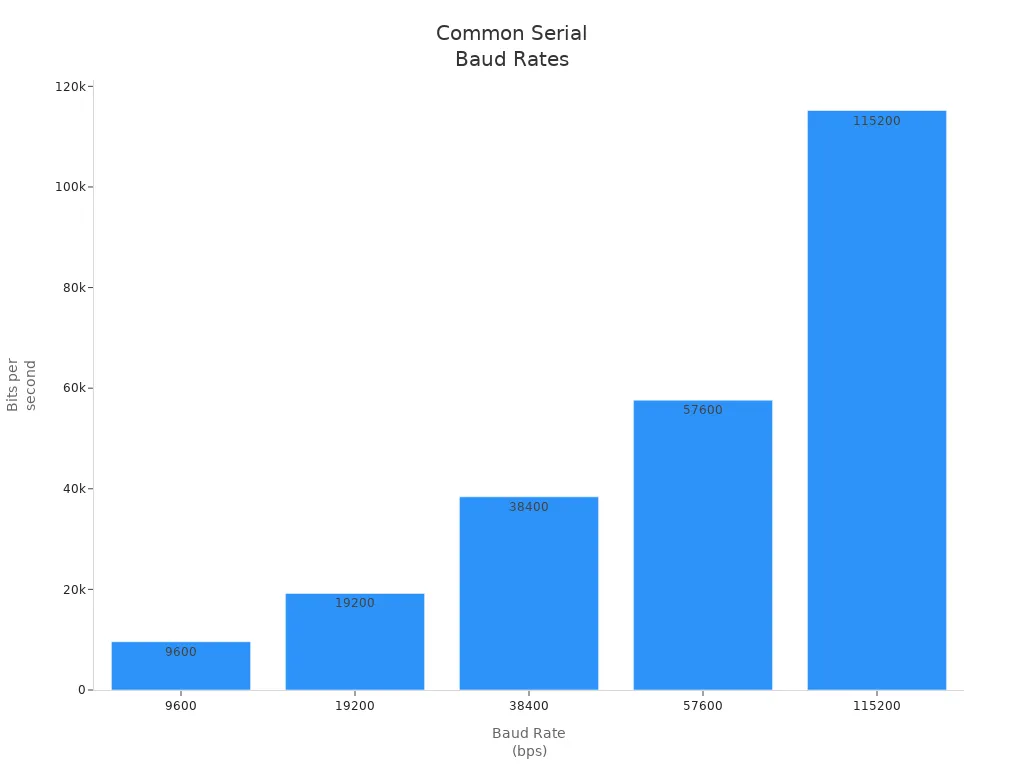
Common baud rates in serial communication protocols include 300, 1200, 2400, 9600, 19200, and 115200 bps. You see 9600 as the most widely used value in the industry.
Baud rate in modern communication is important in many fields. In industrial settings, you use baud rate for machinery communication. Military applications need specific baud rates for secure transmission. Marine navigation systems rely on optimized baud rates for safety. Medical devices need proper baud rates for accurate data transmission.
When you choose a baud rate, you must think about compatibility. All devices must use the same baud rate. Higher baud rates can cause more transmission errors. You need to balance speed and accuracy. Other factors like bandwidth and error detection also matter.
baud rate and bit rate

Key Differences
You often see confusion between baud rate and bit rate when you work with digital systems. These two terms look similar, but they measure different things. Baud rate counts how many times the signal changes every second. Bit rate measures how many bits move each second. You use baud to describe the number of symbols sent per second. You use bit rate to show the amount of data transferred in bits per second (bps).
Here is a table that helps you see the differences:
| Bit Rate | Baud Rate |
|---|---|
| Bit rate is defined as the transmission of a number of bits per second. | Baud rate is defined as the number of signal units per second. |
| Bit rate is also defined as per second travel number of bits. | Baud rate is also defined as per second number of changes in signal. |
| Bit rate emphasized computer efficiency. | Baud rate emphasized data transmission. |
| The formula of Bit Rate is: = Baud Rate × Number of Bits per Baud | The formula of Baud Rate is: = Bit Rate / Number of Bits per Baud |
| Bit rate is not used to decide the requirement of bandwidth for transmission of the signal. | Baud rate is used to decide the requirement of bandwidth for transmission of the signal. |
| Bit Rate cannot determine the bandwidth. | Baud rate can determine the amount of bandwidth necessary to send the signal. |
| It counts the number of bits traveled per second such as Kbps, Mbps, Gbps, etc | It counts how many times the state of a signal is changing. |
You see that bit rate and baud rate do not always match. If you use simple encoding, one symbol equals one bit. In advanced systems, one symbol can carry more than one bit. This makes the bit rate higher than the baud rate.
Relationship
You need to understand the relationship between baud rate and bit rate to design digital systems. The formula shows how these rates connect:
Bit rate (bps) = Baud rate (baud) × Bits per symbol
If you use multi-level modulation, you can send more bits with each symbol. For example, if the baud rate is 1000 baud and each symbol carries 4 bits, the bit rate becomes 4000 bits per second. You see this in modern communication systems. If the symbol rate is 4800 baud and each symbol represents two bits, the bit rate reaches 9600 bps.
The relationship between baud rate and bit rate helps you choose the right settings for your devices. You use baud rate to bit rate conversion when you set up communication protocols. You must match the baud rate on both devices to avoid errors. If you use different baud rates, the devices cannot talk to each other. This leads to data loss and transmission problems.
Tip: Always check the baud rate settings before connecting devices. Matching baud rates prevents communication failures and keeps your data safe.
Why It Matters
You need to know the difference between baud rate and bit rate to build reliable digital systems. When you understand these terms, you can improve system efficiency. You make sure devices work together without errors. You optimize data transmission and avoid problems.
Here is a quick list of reasons why this knowledge matters:
- You enhance communication system efficiency.
- You ensure compatibility among devices.
- You optimize data transmission for speed and reliability.
If you set the wrong baud rate, you risk data corruption and communication failures. Both sender and receiver must use the same baud rate. If not, the devices misinterpret signals. This causes data loss and increases transmission errors. You must synchronize the baud rate to keep your system running smoothly.
The relationship between baud rate and bit rate also depends on modulation. Modulation lets you send more bits per symbol. This means the bit rate can be higher than the baud rate. You use this knowledge to choose the best settings for your application.
When you work with digital systems, you see baud rate and bit rate in every communication protocol. You use bps to measure data speed. You use baud to measure signal changes. You need both values to design, troubleshoot, and optimize your systems.
Related Terms
Symbol
You see the term "symbol" often in digital communication. A symbol marks a distinct change in the signal state on a serial line. In rs-232c and other common serial interfaces, each symbol can represent one or more bits of digital data. The baud rate measures how many symbols you send every second. If you use simple binary encoding, each symbol equals one bit. In advanced systems, each symbol can carry several bits, which increases the bit rate.
| Term | Definition |
|---|---|
| Symbol | A distinct change in the signal state (e.g., a voltage level transition) on the communication line. |
| Baud Rate | Specifies the speed of serial communication in symbols per second. |
Tip: Baud rate tells you how many symbols move through the communication channel every second. Each symbol may carry more than one bit, depending on the modulation.
Bandwidth
Bandwidth shows the range of frequencies available for data transmission. You need enough bandwidth to support the baud rate you choose. If you use rs-232c or ethernet, higher baud rates require more bandwidth. Fiber optic cables offer much higher bandwidth than copper, which means you can send more data over longer distances. The transmission medium must handle the bit rate and minimize interference.
- Fiber technology gives you symmetrical bandwidth for upload and download.
- Copper uses electrons, while fiber uses photons, so fiber transmits more data per second.
Modulation
Modulation changes the signal so you can send digital data over a communication channel. The type of modulation affects the baud rate you can achieve. Basic methods like binary ASK or FSK send fewer bits per symbol, which limits the baud rate. Advanced techniques such as QAM or PSK let you send more bits with each symbol, increasing both baud and bit rate. You see these methods in usb, ethernet, and rs-232c systems.
Data Rate
Data rate tells you how much data moves through the communication channel every second. You calculate the data rate by multiplying the baud rate by the number of bits per symbol. In serial communication, you want a high data rate for fast data transmission. If you use advanced modulation, you can boost the data rate without raising the baud rate.
Channel Capacity
Channel capacity sets the maximum rate for reliable data transmission over a communication channel. You measure channel capacity in bits per second. Bandwidth and signal quality affect channel capacity. If you increase bandwidth, you raise channel capacity and can support higher baud rates. In rs-232c and other common serial interfaces, channel capacity limits how much digital data you can send.
"The relationship between channel capacity and baud rate is established through Shannon's Theorem, which provides a formula to calculate channel capacity based on factors such as bandwidth and signal-to-noise ratio."
Calculations and Examples
Formulas
You need to know the right formulas to work with baud and bit rate in digital systems. When you want to calculate baud rate, you use a simple formula. The baud rate tells you how many signal changes happen each second. Bit rate shows you how much data moves every second.
Here is a table that shows the main formula:
| Bit Rate | Baud Rate | Bits per Symbol |
|---|---|---|
| Bit Rate = Baud Rate × Bits per Symbol |
If you want to calculate baud rate, you can rearrange the formula:
Baud Rate = Bit Rate / Bits per Symbol
This formula helps you find the baud rate when you know the bit rate and the number of bits in each symbol. You use this formula for many digital communication systems.
Example Calculations
You see baud values like 9600 and 19200 in many devices. You can calculate baud rate for these common speeds using the formula above. Let’s look at some examples:
- If you have a bit rate of 9600 bps and each symbol carries 1 bit, the baud rate is 9600.
- If you use a bit rate of 19200 bps with 1 bit per symbol, the baud rate is 19200.
- In systems with advanced modulation, you might use PAM-4. PAM-4 encodes 2 bits per symbol. If your data rate is 224 Gb/s, you calculate baud rate as 224 Gb/s divided by 2, which gives you 112 Gbaud.
You can use this method to calculate baud rate for any system. The symbol rate tells you how many signal changes happen each second. The number of bits per symbol shows how much data each signal change carries.
Tip: Always check the number of bits per symbol before you calculate baud rate. This helps you avoid mistakes and keeps your system running smoothly.
Interpreting Results in Practical Scenarios
When you calculate baud rate, you learn important things about your system. Higher baud rates let you send data faster. You improve communication efficiency and get better performance. You also need to think about bandwidth. Higher baud rates need more bandwidth. If you use a lower baud rate, you might not use your channel as well.
You must balance speed and accuracy. If you raise the baud rate too much, you risk more errors. You need good error detection and correction methods. All devices must use the same baud rate. If they do not match, you get failures or data loss.
- Higher baud rates improve data transmission speed.
- More bandwidth is needed for higher baud rates.
- You must use error correction for fast systems.
- Devices must match baud rates for reliable communication.
When you understand how to calculate baud rate, you make better choices for your digital systems. You keep your data safe and your devices working together.
Practical Importance
System Performance
You need to understand the importance of baud rate when you design or troubleshoot digital systems. Baud rate controls how fast symbols move through your communication channel. This speed affects both data transmission and overall system performance. When you select a higher baud rate, you increase the symbol rate. This change can boost your bit rate and move more data every second. You see this effect in serial communication, where fast updates matter.
However, higher baud rates can make hardware design more complex. You may notice more noise and errors in your communication. You must balance speed and reliability. If you push the baud rate too high, you risk losing data or corrupting signals. You also need to consider bandwidth. More bandwidth supports higher baud rates, but not every system can handle this demand.
Tip: Always check your system’s ability to support the chosen baud rate. Reliable data transmission depends on matching baud rates across devices.
You improve system performance by choosing the right baud rate. You keep communication smooth and prevent failures. You also make troubleshooting easier. When you know the baud rate, you can spot problems quickly and fix them before they affect your data.
- Baud rate sets the symbol rate for your system.
- Higher baud rates increase bit rate but may cause more errors.
- Lower baud rate improves reliability in noisy environments.
- Proper baud rate configuration prevents communication failures.
Choosing Baud Rate
When you select a baud rate for your digital system, you must consider several factors. The right choice supports fast and reliable communication. You also protect your data and keep your devices working together.
- Compatibility: Make sure all devices support the same baud rate.
- Energy Efficiency: Choose a baud rate that does not waste power.
- Error Handling: Use error detection and correction for reliable data transmission.
- User Experience: Pick a baud rate that allows real-time updates.
- Testing: Test your system at different baud rates to find the best setting.
- High-Speed Communication: Use higher baud rates for industrial systems that need fast monitoring.
- Robust Error Handling: Add advanced error correction for noisy environments.
- Security: Think about how baud rate affects data security.
- Integration: Match the baud rate with existing systems.
- Scalability: Choose a baud rate that lets your system grow.
- Standards: Follow industry standards for baud rate settings.
You also need to look at the environment and system size. The table below shows best practices for industrial networks:
| Factor | Details | Recommendations |
|---|---|---|
| Distance Between Devices | Longer distances weaken signals. | Use lower baud rate for long distances. |
| Number of Devices | More devices increase bus contention. | Lower baud rate for large networks. |
| Noise Levels | High noise can distort signals. | Use lower baud rate and shielded cables. |
| Data Volume | Large packets need reliable transmission. | Lower baud rate for high data volume. |
| Device Capabilities | Older devices may limit baud rate. | Check device manuals for supported baud rates. |
You see the importance of baud rate in every step of system design. You keep communication reliable and data safe. You also make sure your system meets all requirements.
Mastering baud rate concepts helps you build reliable digital systems. You see the impact of baud rate in many fields:
- Home appliances use baud rate for smooth communication between parts.
- Industrial systems rely on baud rate for real-time monitoring and control.
- Medical devices need the right baud rate to send patient data quickly and safely.
| Aspect | Impact on Communication |
|---|---|
| Communication Efficiency | Faster data transmission |
| Device Compatibility | All devices must match baud settings |
A clear understanding of baud and related terms lets you improve system design and solve problems faster. Use this glossary whenever you face new digital communication challenges.
FAQ
What happens if devices use different baud rates?
If devices use different baud rates, you see communication errors. Data may not transfer correctly. Devices can lose information or fail to connect. Always match baud rates for reliable data exchange.
Can you increase data speed without raising baud rate?
You can increase data speed by using advanced modulation. Each symbol carries more bits. This method boosts bit rate while keeping the baud rate the same.
Why do some systems use lower baud rates?
Some systems use lower baud rates to reduce errors. Lower rates help in noisy environments. You get more reliable communication, especially over long distances.
How do you choose the right baud rate for your project?
You check device compatibility, distance, and noise levels. Test different settings. Pick a baud rate that balances speed and reliability for your needs.
Is baud rate important for wireless communication?
Yes, baud rate matters in wireless systems. It affects how fast symbols move through the channel. You must set the correct rate for stable and efficient wireless data transfer.