Flash Drives The Pros and Cons for 2025
In 2025, flash drives remain a surprisingly relevant storage choice, with a global market projected to reach $9.34 billion. Their role in modern data management is specific and important. Understanding what is a flash drive helps users pick the right tool for their needs.
They are a top choice for portable, quick-access storage tasks. However, they have clear limits for long-term backup and sensitive data storage.
This distinction is crucial for effective data handling.
Key Takeaways
- Flash drives are small and easy to carry, making them good for moving files quickly.
- They are fast for moving large files, but slow for many small files.
- Flash drives are strong and can handle drops because they have no moving parts.
- Flash drives wear out over time and cost more per storage space than other options.
- They can be lost easily and can spread computer viruses if you are not careful.
What Is a Flash Drive?
Many people ask, what is a flash drive? A flash drive is a small, portable data storage device. People often call it a thumb drive or a USB stick. This device uses flash memory for storage. It connects to computers and other hardware through a USB port. The core of this technology is its non-volatile nature.
Non-volatile storage means the device holds data even without a power source. This makes flash storage perfect for moving files between locations.
Defining Flash Memory
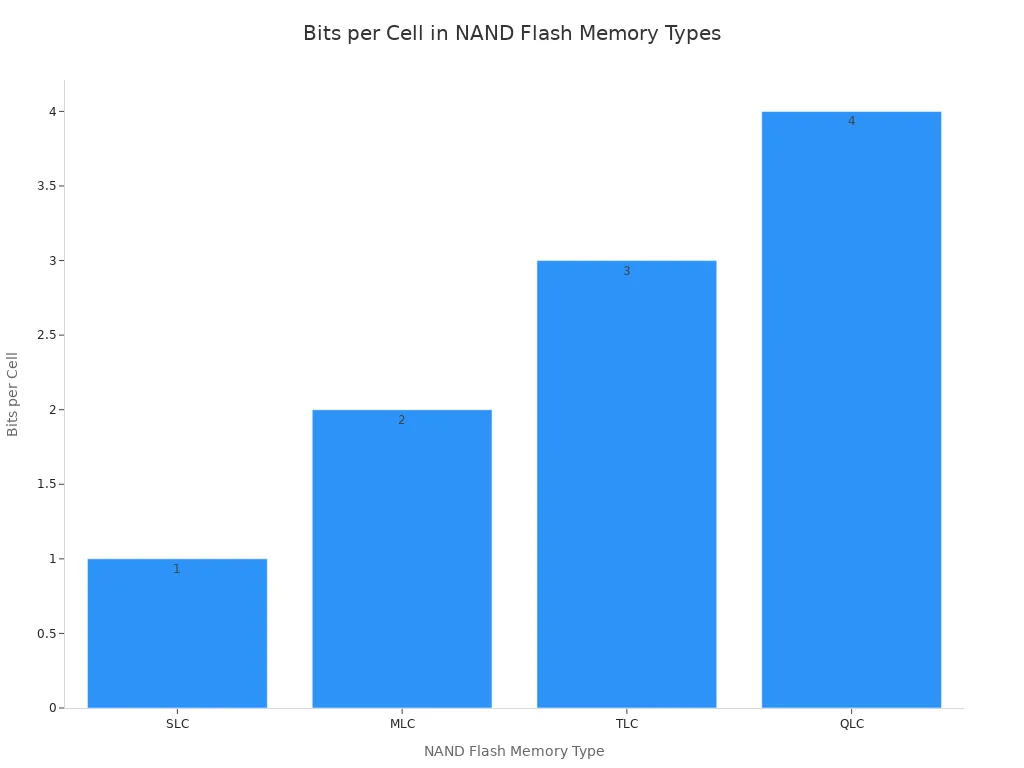
Flash memory is a type of electronic storage. It stores data using electric circuits built with floating-gate transistors. These transistors trap or release electrons to represent data as 1s and 0s. This process allows the flash memory to retain information securely. The quality of flash storage varies. Different types exist, such as SLC, MLC, TLC, and QLC. Each type offers a different balance of speed, cost, and durability. Cheaper drives often use lower-end flash memory, which affects their lifespan. Understanding what is a flash drive involves knowing about its internal flash memory.
How It Compares to Other Drives
A key question is what is a flash drive compared to other storage options. Flash drives differ significantly from portable Solid-State Drives (SSDs) and Hard Disk Drives (HDDs). While all provide storage, their design serves different purposes. A flash drive uses simpler controllers than an SSD. This makes it better for occasional file transfers, not constant use. The table below shows a clear comparison of this data storage device.
| Feature | Flash Drive | Portable SSD | Portable HDD |
|---|---|---|---|
| Intended Use | Occasional file sharing | Frequent read/write operations | Mass data storage and backup |
| Controller Quality | Less sophisticated | High-quality and efficient | Mechanical components |
| Typical Weight (1TB) | 5g - 50g | 50g - 200g | 200g - 1kg |
This comparison highlights why choosing the right flash storage is important for your specific needs.
Key Advantages of Flash Memory
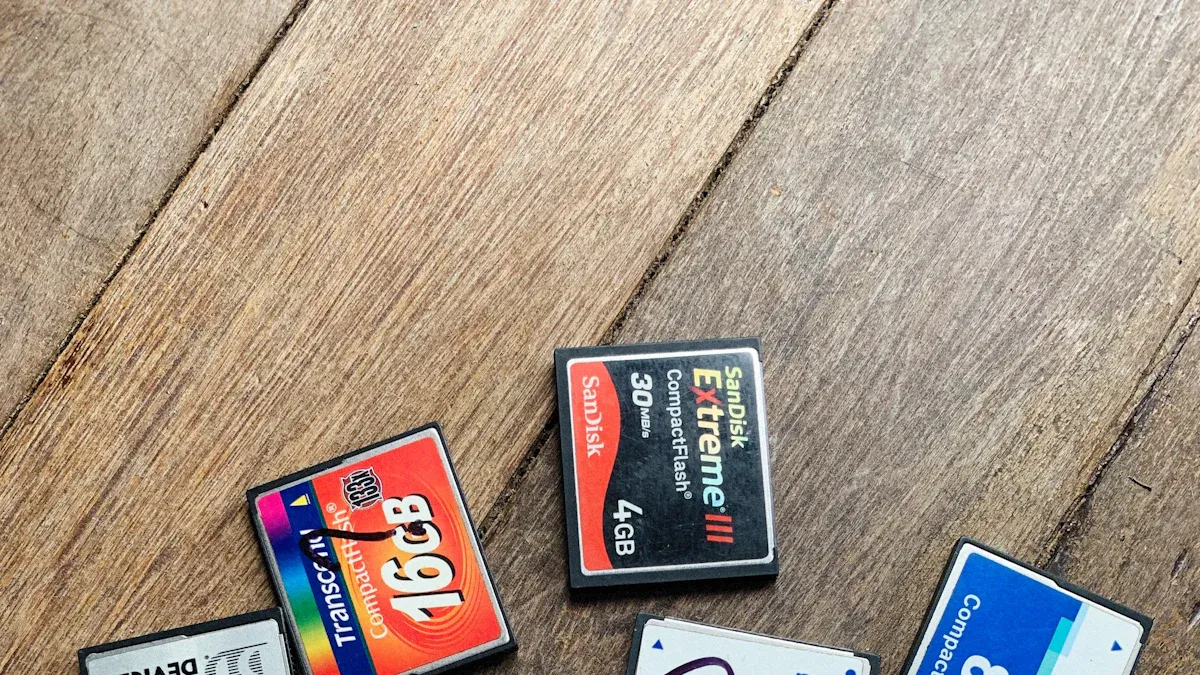
The advantages of flash memory make it a powerful tool for specific tasks in 2025. Users gain significant benefits from its unique design and capabilities. These advantages center on portability, speed, and durability. Understanding these advantages helps people choose the right storage solution. The core advantages of flash memory define its role against other storage types. These practical advantages ensure its continued relevance. The main advantages are clear. The following sections explore the key advantages of flash memory in detail, highlighting the practical advantages for everyday use. The advantages are numerous.
Unmatched Portability and Access
The primary advantage of flash memory is its extreme portability. Modern flash drives offer massive storage capacity in incredibly small forms. For example, the SanDisk Ultra Fit and PNY Elite-X Fit pack 512GB of storage into a device smaller than a coin. This small size and light weight make them easy to attach to keychains or slip into a pocket. This portability offers clear advantages.
A key feature of this portable storage device is its ability to function without an internet connection. This makes it a reliable choice for moving data between locations where network access is unavailable or insecure.
Unlike cloud storage, a USB stick provides direct, physical control over your data. You can access files on any compatible machine, anywhere, anytime, without worrying about Wi-Fi signals or data plans.
Furthermore, flash storage consumes very little power. An idle SanDisk 8GB USB 2.0 drive, for instance, draws only about 28mA. This low power draw ensures that the device will not significantly drain a laptop's battery, reinforcing its status as a top-tier portable storage solution.
Fast Data Processing Speeds
Modern flash drives deliver impressive data transfer speeds. The speed depends on the device's technology and the port it uses. The evolution of the USB standard is a major factor.
- USB 3.2 Gen 2x2 offers theoretical speeds up to 20 Gbps.
- USB4 pushes this limit even further to 40 Gbps.
These high transferring speeds allow users to move large files, like 4K videos or entire project folders, in seconds rather than minutes. This speed is one of the main advantages of this technology. However, the type of data being moved greatly affects the actual read/write speeds. Transferring a single large file is much faster than transferring thousands of small ones.
File system overhead causes this difference. A system can transfer a large 3GB file at over 20 MB/sec. The same system transferring 60,000 small files might slow to just 25-75 kB/s. Each small file requires individual processing, which creates a bottleneck.
This means that for optimal data transfer performance, users should consider archiving many small files into a single compressed file before initiating the transfer.
Enhanced Reliability and Durability
The construction of flash memory provides excellent reliability and durability. Unlike HDDs, flash drives have no moving parts. This solid-state design offers two significant advantages. First, it makes the flash storage highly resistant to physical shock and vibration. Many drives are rated to withstand forces up to 1000G, equivalent to a 1.5-meter drop onto concrete. Second, it allows them to operate in a wide range of environments.
| Feature | Standard Temperature Grade | Industrial Extended Temperature Grade |
|---|---|---|
| Operating Temperature Range | 0°C to +70°C | -40°C to +85°C |
| Shock Resistance | Built to endure high impact | Built to endure high impact |
Some ruggedized flash drives offer even greater protection with official IP ratings. An IP67 rating, for example, means the device is completely dust-tight and can be submerged in water. This durability makes flash memory a reliable choice for data transport.
Reliability is also measured by Mean Time Between Failures (MTBF). Solid-state technology generally has a much higher MTBF than traditional hard drives. Enterprise-grade SSDs, which use similar principles as flash memory, boast an MTBF of 1,500,000 hours compared to 300,000 for HDDs. This metric indicates a lower expected failure rate over the device's lifespan, giving users greater confidence in their storage.
Key Disadvantages of Flash Memory
While flash drives offer great convenience, users must understand their significant disadvantages. These drawbacks relate to lifespan, cost, and security. Acknowledging these issues helps people make informed decisions about their data storage strategy. The disadvantages of flash memory are critical factors for any user to consider.
Limited Lifetime and Write Cycles
Every flash memory device has a limited lifespan. The memory cells inside can only handle a finite number of write and erase cycles. Over time, these cycles cause the cells to wear out. This wear can make the flash storage susceptible to data corruption. Eventually, parts of the drive may fail, leading to data loss. For example, a user who ran applications directly from a flash drive reported that it developed "so many bad sectors" and failed because it "ran out of write limit." This shows a real-world risk of data corruption from heavy use.
To combat this issue, manufacturers use a technique called wear leveling. This process evenly distributes write operations across all memory cells. It prevents specific cells from wearing out too quickly.
There are different types of wear leveling:
- Dynamic Wear Leveling: This method writes data to blocks with the lowest erase count but only considers blocks that are currently in use.
- Static Wear Leveling: This more advanced method includes all blocks, even those holding static data. It moves old data to more frequently used blocks to free up less-used blocks for new writes.
- Global Wear Leveling: This works like static wear leveling but applies the process across the entire flash memory device, offering the best lifespan extension.
Despite these techniques, the fundamental limitation remains. Flash memory is not ideal for tasks involving constant writing and rewriting, making it a poor choice for running operating systems or applications.
Higher Cost Per Gigabyte
One of the main disadvantages of flash drives is their higher cost per gigabyte compared to other storage options. While prices have fallen, flash storage is still more expensive than traditional hard disk drives (HDDs) for large-capacity needs. This makes them less economical for mass data backup. The limited storage capacity of affordable drives is a key drawback.
A direct comparison in 2025 shows this price difference clearly.
| Storage Type | Approximate Cost per Gigabyte (2025) |
|---|---|
| Portable HDD | ~$0.02 - $0.03 |
| External SSD | ~$0.06 - $0.08 |
| USB Flash Drive | ~$0.075 |
As the table shows, the cost of a portable HDD is less than half that of flash storage. This makes HDDs a better choice for archiving large amounts of data, like photo libraries or video collections. While the price gap is narrowing, the limited storage capacity for a given price remains a significant factor.
Security Risks from Loss and Theft
The small size of flash drives makes them incredibly portable but also easy to lose or steal. A lost or stolen unencrypted drive poses a serious security risk. Anyone who finds the device can access all the data stored on it. This risk is not just theoretical.
Between January 2020 and December 2023, lost or stolen unencrypted portable devices accounted for over 50 major data breaches, affecting more than 1 million individuals. In one notable case, a lost thumb drive from a cancer center exposed the private information of nearly 2,300 patients.
To protect against this risk, users can choose hardware-encrypted flash drives. These drives use built-in encryption to protect data. Many are certified under the Federal Information Processing Standard (FIPS 140-2), which defines security levels.
- Level 1 provides basic security.
- Level 2 requires features that show evidence of tampering.
- Level 3 mandates that the drive destroy its encryption keys if someone tries to physically break into it.
Using an encrypted USB drive is a crucial step for anyone carrying sensitive information.
Vulnerability to Malware
Flash drives are a common vector for spreading malware. Plugging an infected USB drive into a computer can introduce viruses, ransomware, or spyware to a system or network. One of the most dangerous types of attacks is the "BadUSB" attack.
A BadUSB device looks like a normal flash drive but acts like a keyboard. When plugged in, it can rapidly type and execute malicious commands to download malware or take over a computer. The FBI has issued warnings about cybercrime groups like FIN7 using this method. They mailed malicious USB drives disguised as gifts to employees. When an employee plugged in the drive, it installed ransomware on the company's network. This highlights a major security risk.
Furthermore, performance can suffer when multiple flash drives share a single USB hub. The shared bandwidth can slow down transfer speeds for all connected devices, creating a bottleneck.
To protect against these disadvantages, users should follow best security practices:
- Never plug in a flash drive from an unknown source.
- Use up-to-date antivirus software to scan all external drives.
- Disable the "Autorun" or "Autoplay" features on your computer to prevent code from executing automatically.
These simple steps can significantly reduce the risk of malware infection and data corruption.
The Verdict: Choosing Your Storage
Choosing the right storage depends entirely on the job. Flash drives are excellent tools for specific, temporary tasks, but they are not a one-size-fits-all solution. A smart data storage strategy uses different tools for different needs.
Best Use Cases for Temporary Storage
Flash drives shine in situations requiring portability and quick data transfers. Their small size and universal compatibility make them the best device for certain jobs. The best use cases for flash storage involve moving data or creating temporary tools.
Common uses include:
- Creating a bootable installer to perform a clean installation of an operating system.
- Making an emergency disk for troubleshooting a computer when internet access is unavailable.
- Updating firmware on industrial or embedded systems, where their non-volatile flash storage retains data without power.
These tasks leverage the core strengths of flash storage: portability and simplicity. The limited capacity of most drives is not a drawback for these focused applications.
When to Use Cloud or External HDDs
For long-term data archiving, collaborative projects, and primary file backups, users should look to other storage solutions. External HDDs offer a much lower cost per gigabyte, making them ideal for storing large amounts of data that people do not access frequently. The choice between an SSD and an HDD often depends on the user's immediate needs.
| Feature | External SSD | External HDD |
|---|---|---|
| Best For | Active projects, on-location work | Archiving, backups, long-term storage |
| Speed | Extremely Fast | Slower |
| Durability | Very Durable (no moving parts) | Fragile (moving parts) |
| Cost | More expensive per gigabyte | Much cheaper per gigabyte |
Cloud storage provides unmatched accessibility and collaboration features. It allows multiple users to access and edit files from any location, ensuring everyone has the most recent version. Cloud providers also handle server maintenance and offer scalable capacity.
For a robust data protection plan, professionals recommend the 3-2-1 rule: Keep 3 copies of your data on 2 different media types, with at least 1 copy stored off-site (like in the cloud).
This approach ensures your important data remains safe from device failure, loss, or disaster.
In 2025, flash drives remain useful tools within a larger storage strategy. The flash memory offers excellent portability for moving data. However, users must consider its limited lifespan and security risks. A smart data plan uses flash storage for temporary tasks.
Final Recommendation: Use flash storage for quick file transfers. Rely on cloud services or external drives for primary data backup and long-term storage. Understanding what is a flash drive helps users create a secure and effective storage system for their flash memory and other data.
FAQ
How long does a flash drive last?
A flash drive's lifespan depends on write cycles, not time. Each memory cell can only be written to a limited number of times. Heavy, constant use wears the drive out faster than occasional use. Most drives last for several years under normal conditions.
Is a flash drive the same as an SSD?
No, they are different. A portable SSD has a more advanced controller. It handles frequent read/write tasks well. A flash drive uses a simpler controller. It works best for occasional file transfers and temporary storage, not for running programs.
What is the safest way to use a flash drive?
Users can improve security in a few ways.
- Use hardware-encrypted drives for sensitive data.
- Scan all drives with antivirus software before opening files.
- Never plug in a USB drive from an unknown source.
These steps help protect against data theft and malware.
Why is my flash drive so slow?
Several factors affect speed. The computer's USB port (e.g., USB 2.0 vs. USB 3.2) makes a big difference. Transferring thousands of small files is also much slower than moving one large file. This happens because the system processes each small file individually.