Coaxial Cables 101 Everything You Need to Know
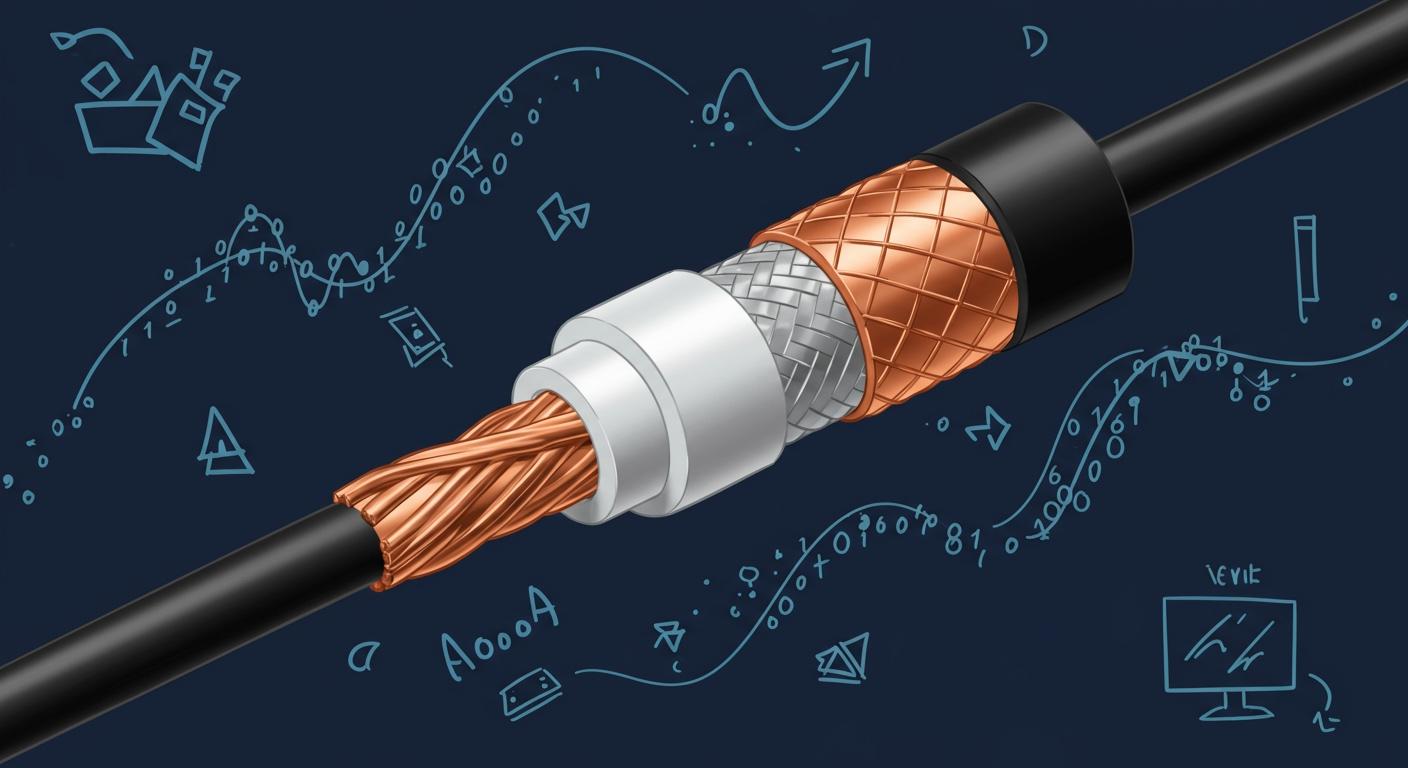
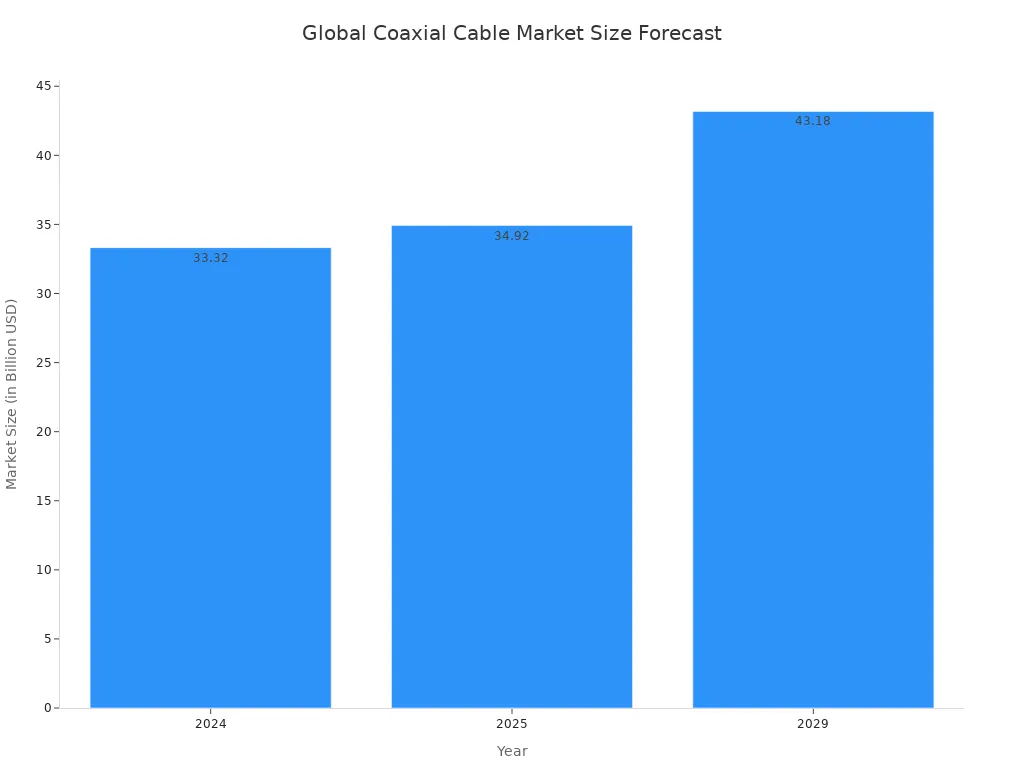
You might wonder, what is a coax cable? It is the essential wire delivering high-frequency signals for your home services. This includes cable television and cable broadband internet. The coaxial cable market continues to grow, showing its lasting importance in our connected world.
Think of a coaxial cable as a shielded tunnel. This special design protects the signal inside. It allows the data to travel with very little signal interference. This ensures you get a clear and stable broadband connection.
Key Takeaways
- Coaxial cables deliver high-frequency signals for services like cable TV and internet.
- Coax cables have a special layered design. This design protects signals from outside interference.
- RG-6 cables are best for modern TV and internet. RG-59 cables are for older systems.
- Always choose an RG-6 cable for new TV or internet setups. This ensures good performance.
- Avoid bending coaxial cables sharply. This can damage the cable and weaken the signal.
What Is a Coax Cable and How It Works
You may ask, what is a coax cable and why does its structure matter? The secret to its performance lies in its unique, layered design. This construction is essential for carrying high-frequency radio frequency (RF) signals with very little loss. Each of the four layers in a coaxial cable has a specific job. Together, they protect the data transmission from outside electrical noise. Let's look at each layer to understand how this special cable works.
The Center Conductor
The journey of your data begins at the very core of the coax cable. This center conductor is typically a solid copper or copper-plated steel wire. Its main purpose is to transmit the actual signal. The diameter and material of this conductor are important. They directly affect the signal's strength and clarity as it travels through the cable.
The Dielectric Insulator
Surrounding the center conductor is a layer of plastic insulation called the dielectric insulator. This layer is critical. It keeps the center conductor perfectly spaced from the metallic shield. This consistent spacing prevents signal loss and short circuits. Different materials are used for this layer, each with unique properties.
- Solid Polyethylene (PE): A common and effective choice for many cables.
- Polyethylene Foam: This material allows for a larger center conductor, which can reduce signal loss. However, it can absorb moisture if the cable is damaged.
- Polytetrafluoroethylene (PTFE): A high-quality, low-loss material used in premium coaxial cables.
The Metallic Shield
Next, you find the metallic shield. This layer is the cable's primary defense against interference. It is a barrier that stops external electromagnetic interference (EMI) and radio frequency interference (RFI) from corrupting your signal. It also prevents the cable's own signal from leaking out. This is what makes a coaxial cable so reliable.
Pro Tip: The type of shielding determines how well your cable is protected. More layers mean better protection. For example, "quad-shield" cables have four layers of shielding and offer maximum defense against signal interference, making them ideal for areas with a lot of electronic noise.
Shields are commonly made of foil or braided wire, and sometimes a combination of both.
| Shielding Type | Best For | Key Feature |
|---|---|---|
| Foil Shield | High-frequency signals (like internet) | Provides 100% coverage but is less flexible. |
| Braid Shield | Low-frequency signals and durability | Woven metal strands offer great flexibility and strength. |
The Outer Jacket
The final, outermost layer is the outer jacket. This is the part of the coaxial cable you see and handle. Its job is to protect all the internal components from physical damage, moisture, and sunlight. For indoor use, most cables have a Polyvinyl Chloride (PVC) jacket. Outdoor cables require a more durable, weather-resistant material like Polyethylene (PE) to withstand the elements. This protective shell ensures your cable has a long and reliable service life.
Main Types of Coaxial Cables
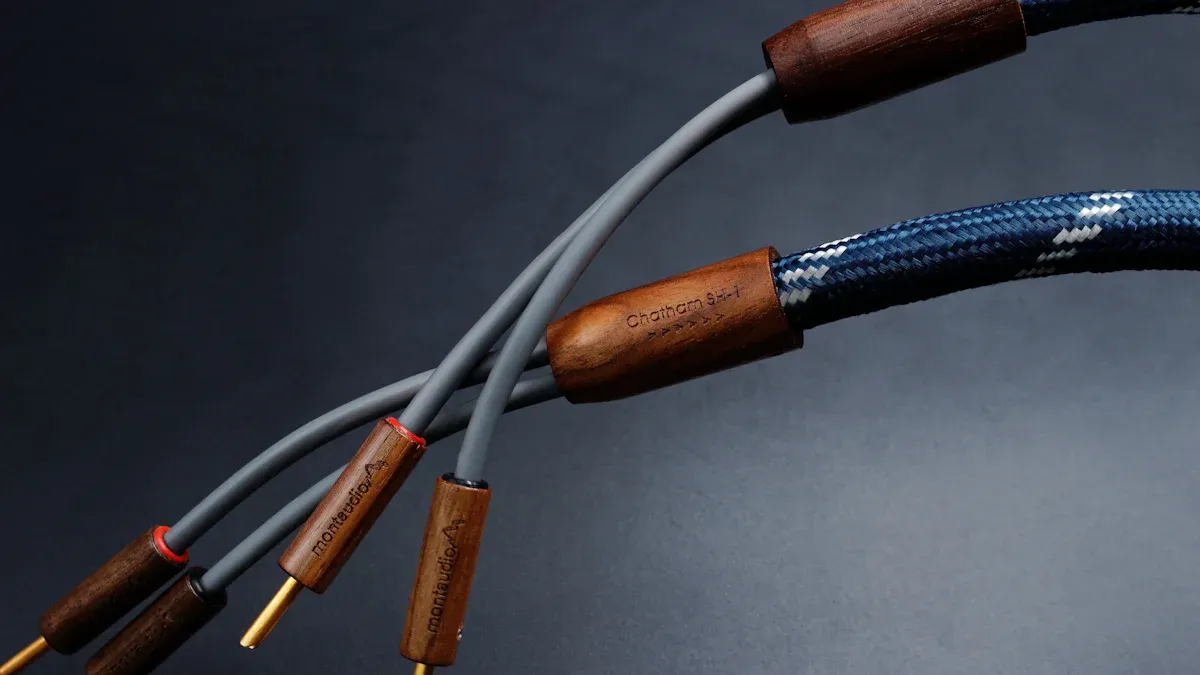
You will find several types of coaxial cables, but for home use, you mainly need to know about two: RG-6 and RG-59. Understanding their differences helps you choose the right cable for your needs. A third type, hard-line, is used for professional applications.
RG-6 for Modern TV and Internet
RG-6 is the modern standard for home entertainment. You should use this cable for your high-definition TV and broadband internet. It has a larger center conductor (18 AWG) and a thicker dielectric insulator. This construction allows it to carry signals with less loss, especially at higher frequencies.
RG-6 coaxial cables are designed for performance. Better shielding protects your signal from interference, ensuring a clear picture and fast internet speeds.
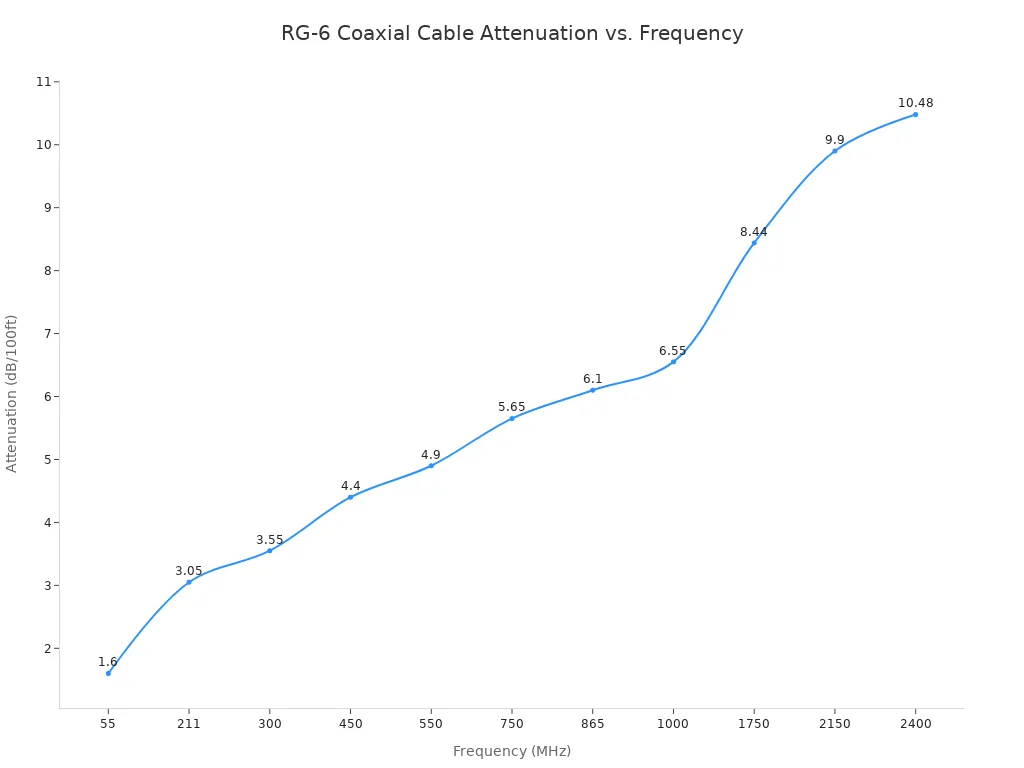
This cable is ideal for digital signals. The chart below shows how signal strength (attenuation) changes with frequency in an RG-6 cable. Higher frequencies, used for internet and HD TV, experience more loss, but RG-6 handles it well over typical home distances.
RG-59 for Older Analog Systems
RG-59 is an older type of coaxial cable. You might find it in older homes, where it was used for analog TV and CCTV systems. It has a thinner center conductor (20 AWG) and less shielding. This design makes it unsuitable for modern digital signals. RG-59 experiences significant signal loss at higher frequencies. Using this cable for your HD TV or internet can lead to pixelation, slow speeds, or a complete loss of signal.
Hard-Line for Professional Use
You will not typically see hard-line coaxial cable in a home. This is a heavy-duty cable used by telecommunications and broadcasting industries. It has a solid metal shield instead of a flexible braid. This rigid construction offers superior protection against signal loss and interference. Its durability makes it perfect for outdoor use and for carrying high-power signals over long distances. Some versions even use pressurized nitrogen gas to prevent moisture from getting inside.
Common Uses and Applications
You encounter coaxial cables in many parts of modern life. They are the backbone for entertainment, communication, and data transfer. Their unique design makes them perfect for specific jobs, from your living room to large broadcast towers.
Home TV and Broadband Internet
In your home, the most common use for a coaxial cable is for cable television and broadband internet. This single cable delivers all the data you need for entertainment and online access. It carries various signals at different frequencies to prevent them from interfering with each other.
- Cable TV Channels: ~60 to 860 MHz
- Broadband Internet (WAN): ~1000 MHz
- Broadband Internet (LAN): ~1150 MHz
This capability allows you to watch high-definition shows and enjoy fast internet through the same connection.
Data and Telecommunications
Coaxial cables are vital in the world of data and telecommunications. Early data centers used coaxial connections, but they were bulky. Modern networks now use this cable to connect antennas, cellular repeaters, and base stations. The cable's shielding is essential for reliable 5G and Wi-Fi systems. It ensures clear data transmission for voice and internet services.
Coaxial cables are valued in telecommunications for their durability and ability to handle large amounts of data. This makes them a reliable choice for building network infrastructure.
| Feature | Why It Matters |
|---|---|
| Durability | The cable is strong and resists physical damage. |
| Shielding | It protects against outside electrical noise. |
| Bandwidth | It supports high speeds for large data volumes. |
| Security | The shielded design makes the cable hard to tap. |
Radio Frequency Broadcasting
You will find coaxial connections in radio and TV broadcasting. They are the standard for connecting transmitters to antennas. The coaxial design carries high-frequency radio signals with very little loss. This ensures the broadcast you receive is clear and strong. For these applications, you must use a high-quality cable with the correct impedance, typically 50 Ohms, to match the equipment. Using a cheap or incorrect cable can weaken the broadcast.
Choosing the Right Coaxial Cable
You need to select the right coaxial cable to get the best performance from your devices. Your choice affects everything from picture clarity to internet speed. You should consider several factors, including the cable type, impedance, and shielding. Making an informed decision ensures you have a reliable and high-quality signal.
RG-6 vs. RG-59
The most common choice you will face is between RG-6 and RG-59 cables. RG-6 is the modern standard for home use. You should use it for digital TV, satellite, and broadband internet. RG-59 is an older cable type you might find in existing installations for analog TV or CCTV cameras.
RG-6 has a larger center conductor and better shielding. This design allows it to carry high-frequency signals over longer distances with less signal loss. RG-59, with its thinner conductor, loses signal strength much faster, especially at the higher frequencies that digital services use.
Key Takeaway: For any new installation for your TV or internet, you should always choose an RG-6 cable. Using an older RG-59 cable for a modern HD signal can cause pixelation, slow speeds, or a complete loss of connection.
The chart below clearly shows how RG-6 outperforms RG-59. Notice how the signal loss (attenuation) for RG-59 increases sharply at higher frequencies compared to RG-6.
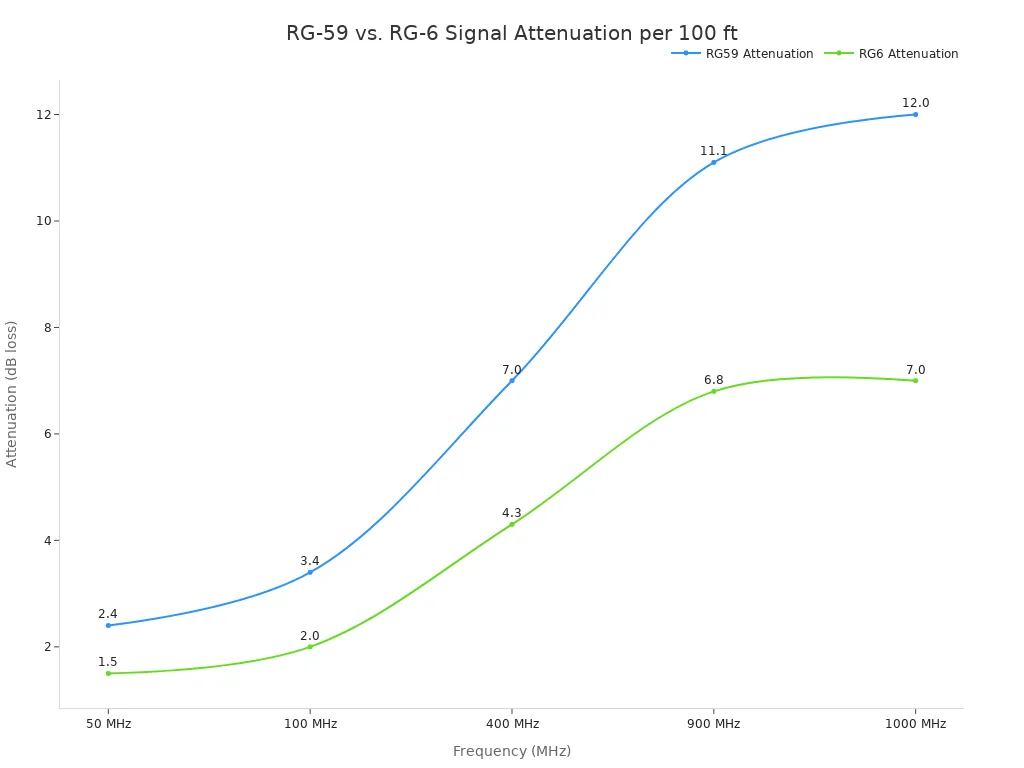
Here is a simple breakdown of their signal loss over 100 feet:
| Frequency | RG-59 Loss (dB) | RG-6 Loss (dB) |
|---|---|---|
| 50 MHz | ~2.4 dB | ~1.5 dB |
| 400 MHz | ~7.0 dB | ~4.3 dB |
| 1000 MHz | ~12.0 dB | ~7.0 dB |
Understanding Impedance
You will often see "75 Ohm" printed on coaxial cables for home use. This is the cable's impedance. Think of impedance as a measure of resistance to the signal flow. For your signal to travel smoothly, the impedance of your cable must match the impedance of your devices (like your TV and modem).
A mismatch in impedance causes major problems. If you connect a 75 Ohm cable to a device expecting a different impedance, some of the signal reflects back down the cable. This creates "ghosting" on analog TV screens and causes data packet loss for your internet, slowing it down. In severe cases, these reflections can even damage sensitive electronic components.
Shielding and Signal Protection
The shielding in a coaxial cable is its armor. It protects your data from outside electrical noise, often called electromagnetic interference (EMI). This interference comes from power lines, appliances, and other electronic devices in your home. Without good shielding, this noise can corrupt your signal, leading to a fuzzy picture or an unstable internet connection.
You can find cables with different levels of shielding:
- Dual-Shield: Has a layer of foil and a layer of braid. This is the minimum for a quality cable.
- Tri-Shield: Adds an extra layer of foil for better protection.
- Quad-Shield: Features two layers of foil and two layers of braid. This offers the best defense against interference and is ideal for areas with a lot of electronic noise.
For most home applications, a dual-shield or tri-shield RG-6 cable provides excellent performance. If you live in a dense urban area or have many electronics near your cable runs, investing in a quad-shield cable is a wise choice.
Common Coaxial Connectors
The connector is the final piece of the puzzle. You must use the correct connector type to link your cable to your devices. For home use, you will almost always encounter the F-type connector. However, it is helpful to recognize others.
- F-Type: This is the standard threaded connector for all home TV and internet equipment. You screw it on to create a secure connection. For best results, use a compression tool to attach these connectors to the cable. This creates a weather-resistant and highly reliable seal.
- BNC: This connector uses a quick-twist bayonet lock. You will find it on older professional video equipment, CCTV cameras, and some lab test gear.
- SMA: This is a smaller, threaded connector used in high-frequency applications like Wi-Fi antennas and cellular repeaters. You are unlikely to see it in a typical home TV setup.
Here is a quick comparison of the connectors you might see:
| Feature | F-Type Connector | BNC Connector | SMA Connector |
|---|---|---|---|
| Visual | Threaded barrel | Larger, bayonet-style lock | Small, threaded barrel |
| Connection | Screws on | Twists and locks | Screws on (precision fit) |
| Primary Use | Cable TV, Internet | CCTV, Broadcast Video | Wi-Fi Antennas, RF devices |
Knowing what is a coax cable and its components helps you make the best choice for your home network.
You now know what is a coax cable and why its layered structure is so important. This design protects high-frequency signals, giving you a clear picture and fast internet. For most modern homes, the RG-6 coaxial cable is the correct choice.
With this knowledge, you can confidently select the right cable. Your choice ensures the best performance for your devices today and for future high-speed services. 🚀
FAQ
Can I use any coax cable for my internet?
You should use an RG-6 cable for your internet service. This type handles high-frequency data much better than older cables. Using the wrong cable can slow down your connection and cause problems with data transmission.
How long can a coaxial cable be before the signal gets weak?
Signal quality decreases over distance. For an RG-6 cable, you should keep the length under 150 feet for best results. Longer runs can weaken the signal and may require an amplifier to boost the data.
Is there a difference between cables for internet and cable television?
Modern systems use the same RG-6 cable for both internet and digital cable television. This single connection efficiently carries all the necessary data for both services. It ensures you get high-quality performance for all your needs.
Can I bend a coaxial cable sharply?
You should avoid sharp bends. Bending the cable too tightly can damage the internal layers. This damage causes signal loss and poor performance. Always create a gentle curve when you route your cable around corners.