RJ11 Connector Applications and Benefits for 2025
You may wonder if the RJ11 connector still matters for your telephone or security system today. In 2025, this connector keeps its place in both homes and businesses. The market for RJ11 connectors reached about $120 million in 2024 and continues to grow, especially across Asia-Pacific and Latin America. You see RJ11 used in healthcare, point-of-sale terminals, and industrial automation. Many telephone connections and security applications still rely on the simple, reliable RJ11 connection for daily operations.
| Aspect | Details |
|---|---|
| Market Value (2024) | US$ 120 million |
| Projected Market Value (2031) | US$ 168 million |
| CAGR (2024-2031) | 5.0% |
| Major Manufacturers | Amphenol, Belden, TE Connectivity, etc. |
Key Takeaways
- RJ11 connectors remain essential in 2025 for telephones, fax machines, DSL internet, and security systems due to their reliability and ease of use.
- The compact design and simple installation of RJ11 connectors make them ideal for homes and small businesses with basic voice and low-speed data needs.
- RJ11 connectors support analog voice signals and low-speed data but cannot handle high-speed internet or advanced digital services like RJ45 connectors.
- Choosing the right RJ11 connector and following proper installation steps ensures clear signals and reduces connection problems.
- Despite newer technologies, RJ11 connectors offer a cost-effective and durable solution for many legacy and current telecommunication applications.
RJ11 Connector
Definition
You use the RJ11 connector every day when you plug in a landline phone or set up a fax machine. The RJ11 connector is a registered jack standard. The Electronic Industries Alliance and the Telecommunications Industry Association developed this standard in the 1970s. The RJ11 connector sets the size, shape, and wiring for telephone and data connections. You find RJ11 connectors in homes and offices because they work with many devices. The connector helps you connect phones, fax machines, and modems to wall outlets or network equipment. The RJ11 connector is recognized worldwide for its compatibility and reliability in telephone systems.
Physical Features
You can spot the RJ11 connector by its small, rectangular shape. The connector measures about 9.65 mm wide and 6.35 mm high. It uses a modular design made of tough plastic and metal contacts. The physical characteristics of rj11 connectors make them easy to handle and install. You see RJ11 connectors with 2, 4, or 6 pins inside a 6-position housing. The compact size lets you fit the connector into tight spaces.
| Feature | RJ11 Connector | RJ45 Connector |
|---|---|---|
| Width | Approximately 9.65 mm | Approximately 11.65 mm |
| Pin Count | 2, 4, or 6 pins in 8-position housing | 8 pins in 8-position housing |
| Typical Use | Single-line telephone connections | Data networking and ethernet |
| Design | Compact, fewer active wires | Supports higher bandwidth and twisted pair cables |
You notice that the RJ11 cable connector is smaller than the RJ45 connector. The RJ11 connector is perfect for telephone lines, while RJ45 connectors handle data networking.
Pin Configuration
You need to understand the pin configuration to wire your RJ11 cable connector correctly. The RJ11 connector usually has a 6-position, 4-contact (6P4C) layout. The center two pins carry the main telephone signals. These pins are called the tip and ring conductors. They send analog voice signals and power to your phone.
- Pin 1: Green wire – Tip conductor, transmits audio signal.
- Pin 2: Red wire – Ring conductor, provides power to the telephone.
- Pin 3: Black wire – Ring conductor (used in two-line setups).
- Pin 4: Yellow wire – Tip conductor (used in two-line setups).
You use the RJ11 cable connector for single-line or two-line phones. The pin configuration affects signal transmission and device power. The RJ11 connector supports analog voice and basic telecommunication services. You get reliable signal transmission for voice calls, but not for high-speed data.
Tip: Always check the pin configuration before installing RJ11 connectors. This step helps you avoid wiring mistakes and ensures clear signal transmission.
RJ11 Applications
Telephones and Voice Communication
You find the rj11 connector at the heart of most telephone systems. This connector links your telephone to the wall jack, making voice communication possible in homes and offices. When you pick up your phone, the rj11 connectors carry your voice through the telephone line connections to the public switched telephone network (PSTN). This setup supports analog voice signals, which are essential for clear conversations.
Many businesses and homes still rely on rj11 connectors for daily telephone use. The connector uses a 6-position 4-contact design, which is perfect for single-line telephone connections. You can use this connector for both residential and commercial telephone systems. The rj11 connector remains a standard for voice-grade applications because it is reliable and easy to install.
Note: RJ11 connectors play a key role in voice communication infrastructure. They support analog voice, making them a trusted choice for telephone systems even as technology advances.
You also see rj11 connectors in private branch exchange (PBX) systems. These systems use the connector to route calls within an organization. The compact size and standard wiring make rj11 connectors ideal for voice-grade applications in both small offices and large buildings.
Fax and Modems
You use rj11 connectors to connect fax machines and dial-up modems to telephone lines. This application remains important in many offices and some homes. When you send a fax, the rj11 connector links your machine to the telephone network. The connector supports analog voice signals and basic data transmission, which is necessary for fax and modem operation.
In many setups, you connect the fax machine to the telephone line using an rj11 cable. If you have DSL internet, you might use an ADSL filter to separate the voice and data signals. The rj11 connector works with both analog and digital signals over copper wiring. This makes it a flexible solution for different telecommunication needs.
Dial-up modems also use rj11 connectors for internet access. Although high-speed internet is common, some areas still rely on dial-up connections. The rj11 connector provides a standard interface for these devices, ensuring compatibility with existing telephone lines.
| Application | Description |
|---|---|
| Fax Machines | Connects fax machines to telephone lines for sending and receiving documents. |
| Dial-up Modems | Links modems to telephone lines for low-speed internet access. |
| DSL Modems | Enables DSL modems to provide internet access over telephone lines, supporting both voice and data. |
You see that rj11 connectors are widely used in dsl systems. They allow you to use the same telephone line for both voice and internet, which is a major benefit in many homes and small businesses.
Smart Home and Security
You might think smart homes only use wireless technology, but rj11 connectors still have a place in modern automation and security. Many alarm systems use rj11 connectors to send alerts over telephone lines. This application is common in both residential and commercial settings. The connector ensures reliable signal transmission, which is critical for security devices.
Some smart home devices, like control panels and monitoring systems, use rj11 connectors for simple control setups. The connector’s compact design and standard wiring make it easy to integrate into existing telephone systems. You can connect these devices to your home’s telephone line, allowing them to communicate with monitoring centers or emergency services.
The demand for rj11 connectors continues in the smart home and security sectors. Even as new technologies emerge, the connector’s reliability and compatibility keep it relevant. You benefit from a proven solution that supports both traditional and modern applications.
Tip: When setting up a security system, check if your devices use rj11 connectors. This can make installation easier and improve system reliability.
The rj11 connector supports a wide range of applications. You use it for analog voice, dsl, fax, and security systems. Its role in voice-grade applications and telephone systems remains strong in 2025.
Benefits of RJ11 Connectors
Reliability
You depend on rj11 connectors for a secure and stable connection in many telecommunication systems. The compact 6-position 4-contact design gives you a reliable wired connection for voice communication. When you install rj11 connectors correctly, you get clear and uninterrupted signals. The modular plug snaps into place, reducing the risk of disconnection or interference. You see rj11 used in homes, offices, and industrial settings because it remains reliable for voice communication and dsl applications. The durable plastic and gold-plated contacts resist corrosion, so you do not need frequent replacements. Regular inspection and proper crimping help maintain performance over time.
Tip: You can trust rj11 connectors for critical applications like alarm systems and fax machines because they deliver consistent results.
Cost-Effectiveness
You save money when you choose rj11 connectors for your telephone and dsl needs. These connectors cost less than alternatives like RJ45 or RJ12. You find basic rj11 adapters for under $2, while more complex connectors cost more. The table below shows how rj11 compares to other connector types:
| Connector Type | Product Example | Price Range (USD) |
|---|---|---|
| RJ11 | Modular Couplers, T Adapters | $0.99 - $1.95 |
| RJ12 | Modular Couplers, T Adapters | $1.69 - $2.39 |
| RJ45 | Modular Couplers, Network Splitters | $1.69 - $15.29 |
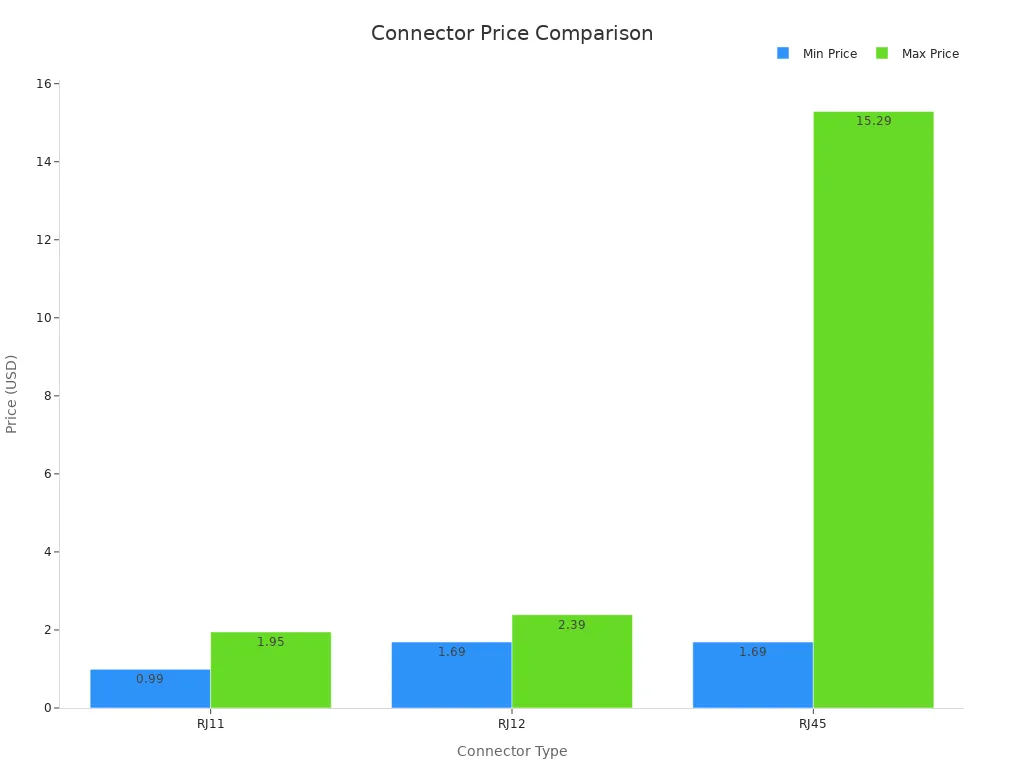
You see the advantages of rj11 connectors in cost for basic telephony and dsl applications. You do not need expensive equipment for analog voice or simple data transmission. The advantages of rj11 connectors make them ideal for homes and small businesses.
Ease of Use
You install rj11 connectors quickly without special tools. The modular design lets you snap the connector into place, making setup easy for both professionals and end-users. You use rj11 for many applications, including telephones, fax machines, and dsl modems. The compact size helps you handle multiple connections in tight spaces. You disconnect and replace rj11 connectors with little effort, saving time during maintenance. The clear plastic and gold-plated contacts add durability, so you spend less on repairs. You benefit from wide compatibility and simple installation, which are key advantages of rj11 connectors.
Note: You can use rj11 connectors for many applications, from basic telephony to dsl internet, without needing advanced skills.
Limitations and Comparison
Limitations of RJ11
You may notice that RJ11 connectors do not meet every modern need. While they work well for basic telephony and dsl, they have several important limits:
- RJ11 connectors support only low bandwidth. You cannot use them for high-speed data transfers.
- The design uses just 2 or 4 conductors. This restricts the amount of data you can send.
- RJ11 works best for analog voice signals. It does not handle digital communication well.
- You cannot use RJ11 for streaming, cloud services, or VoIP. These tasks need more bandwidth than RJ11 can provide.
- The analog nature of RJ11 makes it a poor fit for today’s digital systems.
- Most new data networks use RJ45 connectors instead of RJ11.
- RJ11 still appears in legacy telephony and in rural areas where dsl and landlines remain common.
Note: If you need fast internet or advanced digital services, you should look for other connector types. RJ11 is best for voice, fax, and basic dsl.
RJ11 vs RJ45 and RJ12
You might wonder how RJ11 compares to RJ45 and RJ12 connectors. Each type has its own strengths and uses. The table below shows the main differences:
| Connector | Size & Pins | Wiring Configuration | Common Uses |
|---|---|---|---|
| RJ45 (8P8C) | Larger rectangular plug; 8 metal contact pins | 8 wires (4 twisted pairs) – all 8 used | Ethernet networking supporting speeds up to 10 Gbps or more |
| RJ12 (6P6C) | Same outer size as RJ11; 6 pins loaded | 6 wires – all 6 used (3 pairs) | Multi-line telephone systems, slightly higher data rates than RJ11 |
| RJ11 (6P4C) | Smaller, narrower plug; 4 contacts typically | 4 wires (usually 2 or 4 contacts used) | Analog voice signals, telephone lines, low-speed data up to ~24 Mbps |
RJ45 connectors give you much faster data speeds. You use them for Ethernet and digital networks. RJ12 supports more lines than RJ11, making it better for multi-line phones. RJ11 works for single-line telephones and dsl, but not for high-speed data.
You can see the speed difference in the chart below:
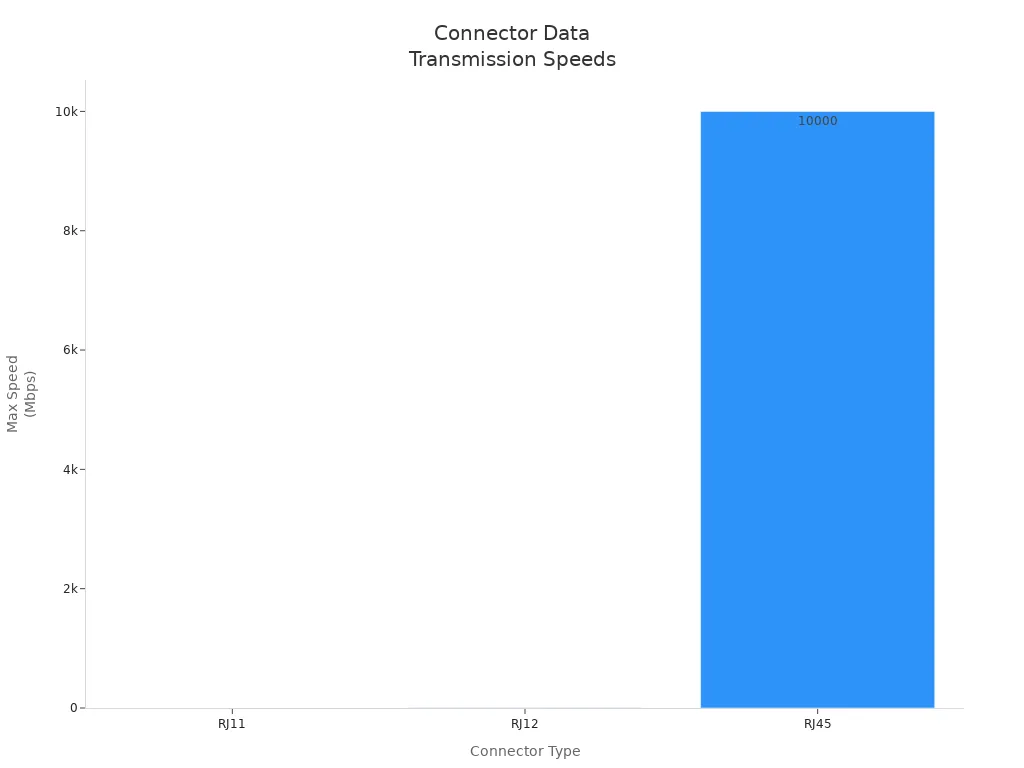
If you try to use RJ11 in a modern network, you will face slow speeds and poor compatibility. RJ11 fits best in voice, fax, and dsl setups, while RJ45 is the top choice for fast internet and digital data.
Installation and Troubleshooting
Choosing RJ11 Connectors
When you select RJ11 connectors for your project, you need to look at several important factors.
- RJ11 connectors have six gold-plated contacts in a modular plug.
- You can choose between 6P2C and 6P4C types, which support different wiring needs.
- The square shape makes them easy to handle and larger than RJ9 connectors.
- RJ11 connectors work best for telephone lines and modem connections, supporting up to four wires.
- Always match the number of contacts and wiring complexity to your application.
- Think about where you will use the connector—homes often need simpler setups, while offices may need more lines.
- Make sure your connector fits your device and wiring plan.
- Avoid plugging RJ11 connectors into RJ45 sockets, as this can cause damage.
Tip: Understanding the differences between RJ11, RJ12, and RJ45 helps you avoid compatibility problems and makes installation easier.
Installation Tips
You get the best results by following good installation practices.
- Use high-quality cables and connectors for durability and fewer failures.
- Always follow the correct wiring color sequence and pin arrangement.
- Strip wires carefully so you do not damage the conductors.
- Use the right crimping tool for installing rj11 connectors.
- Keep cables neat with ties or Velcro straps.
- Label each cable and port for easy maintenance.
- Test every connection with a cable tester before using the system.
- Plan your network layout and leave room for future changes.
- Keep cables away from electrical lines and ground them properly.
| Common Mistake | Why It Happens | How to Avoid |
|---|---|---|
| Wrong crimp connector for cable type | Stranded and solid wires need different connectors | Use the correct connector for your cable |
| Using flat cables for long runs | Flat cables pick up more interference | Use round, twisted pair cables for better performance |
| Poor cable management | Cables get damaged or tangled | Use cable trays and ties to organize cables |
Note: Clean, dry connections and quality materials help prevent signal loss and keep your system working well.
Troubleshooting
If you have trouble with your RJ11 setup, you can solve most problems with a few simple steps.
- Check that all cables are plugged in tightly and not loose.
- Look for damage on the cables, such as fraying or kinks. Replace any damaged cables.
- Reboot your modem or phone by turning it off and on again.
- Test the line with another phone to see if the problem is with the device or the line.
- Make sure you use the right type of filter if you have DSL.
- Keep cables away from sources of interference, like microwaves or routers.
- If you still have issues, contact your service provider or a technician.
Callout: For troubleshooting rj11 connection issues, always check that you use the correct plug and socket. RJ11 and RJ12 look similar but do not always fit well together.
You can avoid most problems by using good cables, keeping connections clean, and following these troubleshooting steps. This approach helps you keep your telephone and modem connections strong and reliable.
You see that RJ11 connectors remain important for telephones, DSL, fax, and alarm systems in 2025.
- You benefit from easy installation, compact size, and reliable performance for voice and low-speed data.
- You find RJ11 ideal for legacy systems, but limited bandwidth means it cannot support high-speed data like RJ45.
| Feature | RJ11 Connector | RJ45 Connector |
|---|---|---|
| Typical Use | Telephony, DSL, Fax | Ethernet Networking |
| Bandwidth | Up to 1 Mbps | Up to 10 Gbps |
For more learning, you can explore guides and technical articles from GoTo, QSFPTEK, and Sealevel to deepen your understanding of telecommunication solutions.
FAQ
Can you use an RJ11 connector for internet access?
You can use RJ11 for DSL internet. RJ11 supports low-speed data. You cannot use RJ11 for high-speed internet like fiber or cable. RJ45 works better for fast internet.
How do you know if your device needs an RJ11 connector?
Check your device’s manual or look at the port. RJ11 ports are smaller than RJ45. Phones, fax machines, and some modems use RJ11. Computers and routers use RJ45.
What should you do if your RJ11 connection stops working?
Tip: First, check if the cable is plugged in tightly. Try another cable or device. Clean the contacts. If you still have problems, call your service provider.
Is RJ11 still useful in 2025?
RJ11 remains useful for telephones, fax, DSL, and alarm systems. You see RJ11 in homes and offices. Newer networks use RJ45, but RJ11 supports many legacy devices.
Can you plug an RJ11 connector into an RJ45 socket?
| RJ11 Plug | RJ45 Socket | Result |
|---|---|---|
| Yes | Yes | Not recommended |
You should not plug RJ11 into RJ45 sockets. This can damage the connector or socket. Always match the plug to the correct port.