Network Interface Controller Explained for Beginners
A network interface controller connects your computer to a network so you can send and receive information. You may hear people call it a network card, network adapter, or LAN adapter. This device lets your computer talk to other devices on the internet or in your home.
If you use a computer or any smart device, you should understand how the network interface controller works. Knowing this helps you solve problems and make smart choices when you upgrade your equipment.
Key Takeaways
- A network interface controller (NIC) connects your computer to a network, allowing data to be sent and received. Without it, your device cannot access the internet.
- NICs come in wired and wireless types. Wired NICs offer stable connections, while wireless NICs provide mobility. Choose based on your needs.
- Understanding how a NIC works helps you troubleshoot network issues and make informed decisions when upgrading your equipment.
- Keep your NIC secure by updating drivers, using strong passwords, and monitoring for unusual activity. This protects your data from threats.
- Check your NIC type in Device Manager to see if you need an upgrade for better speed and performance, especially for gaming or streaming.
What Is a Network Interface Controller?
Simple Definition
A network interface controller, often called a network interface card or NIC, is a small piece of hardware inside your computer or device. You might also hear people call it a network adapter or LAN adapter. This device acts as a bridge between your computer and the network. It lets your device send and receive information with other devices, either at home or across the world.
- A network interface controller usually connects to your computer’s motherboard through a slot called PCIe.
- The NIC contains a special chip, called a controller, that handles the data moving in and out of your device.
- Many computers have a network interface built in, but you can also add one as an expansion card if you need better performance or extra features.
💡 Tip: Without a network interface controller, your computer cannot connect to the internet or talk to other devices on a network.
Main Function
The main job of a network interface controller is to connect your device to a network, such as a local area network (LAN) or a wide area network (WAN). The NIC makes sure your computer can talk to other computers, printers, or servers. It does this by changing the data from your device into signals that travel across cables or through the air.
Here are the key functions of a network interface controller:
| Function | Description |
|---|---|
| Communication | Lets your device talk to other devices on the network. |
| Data Transmission | Changes your data into a format that can travel over the network. |
| Network Connectivity | Keeps your connection stable and reliable, whether at home or at work. |
| Data Reception | Receives and decodes data sent from other devices. |
| Media Access Control | Decides when your device can send data, so devices do not talk over each other. |
A network interface controller works at both the physical and data link layers of the network model. It uses something called a MAC address to identify your device. This unique address helps your computer find and talk to the right device on the network.
You might wonder how a network interface controller is different from other network devices. Here is a quick comparison:
- A NIC connects your computer to a network and handles the data going in and out.
- A router connects different networks together and directs traffic between them.
- A switch connects several devices within the same network and helps them communicate.
The network interface controller is the first step in getting your device online. It takes care of the details, so you can browse the web, play games, or share files without thinking about how the data moves.
How Does a Network Interface Card Work?
Key Components
When you look at a network interface card, you see more than just a simple piece of hardware. Each part has a special job that helps your computer connect to a network. Here are the main components you will find on a typical NIC:
- Connector: This is where you plug in your network cable. Most wired NICs use an RJ-45 connector for Ethernet cables.
- Controller: This chip manages the communication between your computer and the network. It decides how and when data moves in and out.
- Memory: The NIC uses memory to buffer, or temporarily hold, data as it moves between your computer and the network.
- Driver: This is software that lets your operating system talk to the NIC hardware. Without the right driver, your network interface will not work.
- Processor: Some advanced NICs have their own processor. This helps handle more data and improves performance, especially in busy networks.
🛠️ Tip: The quality of these components can affect your network speed and reliability.
A network interface controller also uses a chipset to process data packets. The chipset can use polling, where your computer checks the NIC’s status, or interrupt-driven I/O, where the NIC tells your computer when it is ready to send or receive data. Some NICs use Direct Memory Access (DMA) to move data directly between the network interface card and your computer’s memory. This reduces the load on your computer’s main processor and helps data move faster.
Data Transfer Steps
You might wonder how a NIC actually moves data from your computer to the network and back. The process involves several steps, and each one is important for smooth communication.
Sending Data
- Your computer’s CPU sends data to the NIC through the bus interface. The NIC stores this data in its buffer memory.
- The MAC controller on the NIC creates frames. It adds headers, such as source and destination addresses, and calculates a special code called CRC for error checking.
- The NIC’s PHY (physical layer) converts the digital data into signals. These signals travel through the Ethernet connector and out onto the network cable.
Receiving Data
- The NIC receives signals from the network cable or wireless signal.
- The PHY converts these signals back into digital data.
- The NIC checks the data for errors using methods like Parity Check and Cyclic Redundancy Check (CRC). If it finds an error, it may ask for the data to be sent again or try to fix it.
- The MAC controller removes the headers and passes the clean data to your computer’s CPU.
🔍 Note: Error detection is important. The NIC uses extra bits and special codes to make sure the data arrives safely. If something goes wrong, the NIC can request a retransmission or even fix small errors by itself.
How the NIC Manages Data
A network interface card uses different methods to manage data flow:
- Polling: Your computer checks the NIC to see if it is ready to send or receive data.
- Interrupt-driven I/O: The NIC alerts your computer when it needs attention.
- Direct Memory Access (DMA): The NIC moves data directly to your computer’s memory, which speeds up the process.
Some NICs have multiple queues for incoming and outgoing data. This helps balance the load and improves performance, especially in busy networks.
| Functionality | Description |
|---|---|
| Multi-queue NICs | Assign data packets to multiple receive queues for better performance. |
| Interrupt Handling | Each queue can alert a different CPU core, making things faster. |
| Transmission Packet Steering (XPS) | Spreads outgoing traffic across queues to avoid slowdowns. |
Environmental Factors
You should also know that the environment can affect how well your NIC works:
- High temperatures can cause the NIC to slow down or become unreliable.
- Humidity can damage the NIC’s components and cause errors.
- Dust and strong electromagnetic fields can also create problems for your network interface.
🌡️ Tip: Keep your computer in a cool, dry place to help your network interface card last longer and work better.
A network interface controller is more than just a plug for your network cable. It is a smart device that manages data, checks for errors, and keeps your connection running smoothly. By understanding how each part works, you can make better choices when setting up or upgrading your network.
Types of NICs
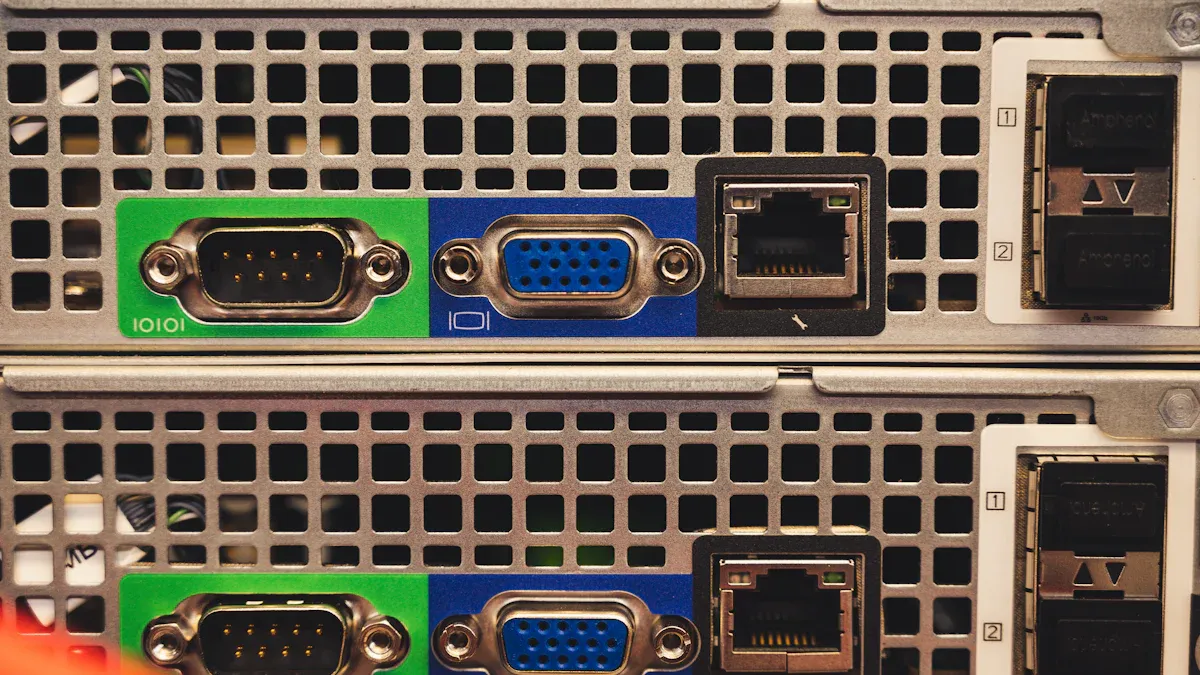
When you look at network interface controllers, you will find several types. Each type connects your device to a network in a different way. You can choose the right NIC for your needs by understanding how each one works.
Wired NIC
A wired NIC connects your computer to a network using cables. Most wired NICs use Ethernet cables and plug into a port on your device. You often see these in desktop computers and servers. Wired NICs give you a stable and fast connection. They work well in places where you need reliable data transfer, like offices or gaming setups.
| Technology | Form Factor | Speed |
|---|---|---|
| Ethernet | PCI Express | Gigabit |
🛡️ Tip: Wired NICs are less likely to lose connection or slow down because they do not face interference from walls or other devices.
Wireless Network Interface Controller
A wireless network interface controller lets your device connect to a network without cables. You may know this as a wireless NIC or Wi-Fi card. It uses radio waves to send and receive data. You find wireless NICs in laptops, tablets, and smartphones. They give you the freedom to move around while staying connected.
| Technology | Form Factor | Speed |
|---|---|---|
| Wireless | USB | 10 Gigabit |
Wireless NIC
A wireless NIC works much like a wireless network interface controller. It connects your device to Wi-Fi networks. You can use a wireless NIC to join networks at home, school, or public places. Wireless NICs are easy to install and do not need cables. They are perfect for people who want mobility and convenience.
| Feature | Wired NICs | Wireless NICs |
|---|---|---|
| Connection Method | Uses cables (Ethernet) | Uses radio waves (Wi-Fi) |
| Data Transmission | Better data transmission over distance | Prone to interference and performance drops |
| Stability | High stability, less interference | Limited range, affected by obstacles |
| Use Case | Ideal for data centers and enterprises | Suitable for convenience and mobility |
📶 Note: Wired NICs give you better speed and stability. Wireless NICs and wireless network interface controllers offer more flexibility but can slow down if there are walls or other devices nearby.
USB and Fiber NICs
You can also find NICs that connect through USB ports. USB NICs are easy to use and work with many devices. You just plug them in, and you are ready to go. They are great for quick fixes or adding a network interface to a device that does not have one built in. However, USB NICs may not be as stable as built-in NICs.
| Advantages of USB NICs | Disadvantages of USB NICs |
|---|---|
| Faster network speed | Badly designed if wired link NIC is used, as it isn't convenient like a remote switch. |
| Reliability | Information is unstable. |
| Security features | Security is minimal low. |
| Compatibility | When wired links are used in Network Interface Card, portability isn't economical and causes inconveniences. |
| Lower CPU usage | The design should be legitimate for better correspondence. |
Optical fiber NICs use light to send data. These NICs work best in places that need very high speeds and long-distance connections, like data centers. Optical fiber NICs keep your data safe from interference and signal loss.
- Performance and Speed: Optical fiber NICs move data much faster than copper-based NICs.
- Distance and Signal Integrity: Optical fiber NICs keep your connection strong over long distances, while copper NICs lose strength after about 100 meters.
💡 Remember: If you need the fastest speeds and the best signal over long distances, optical fiber NICs are the top choice.
NIC Features and Benefits
Speed and Performance
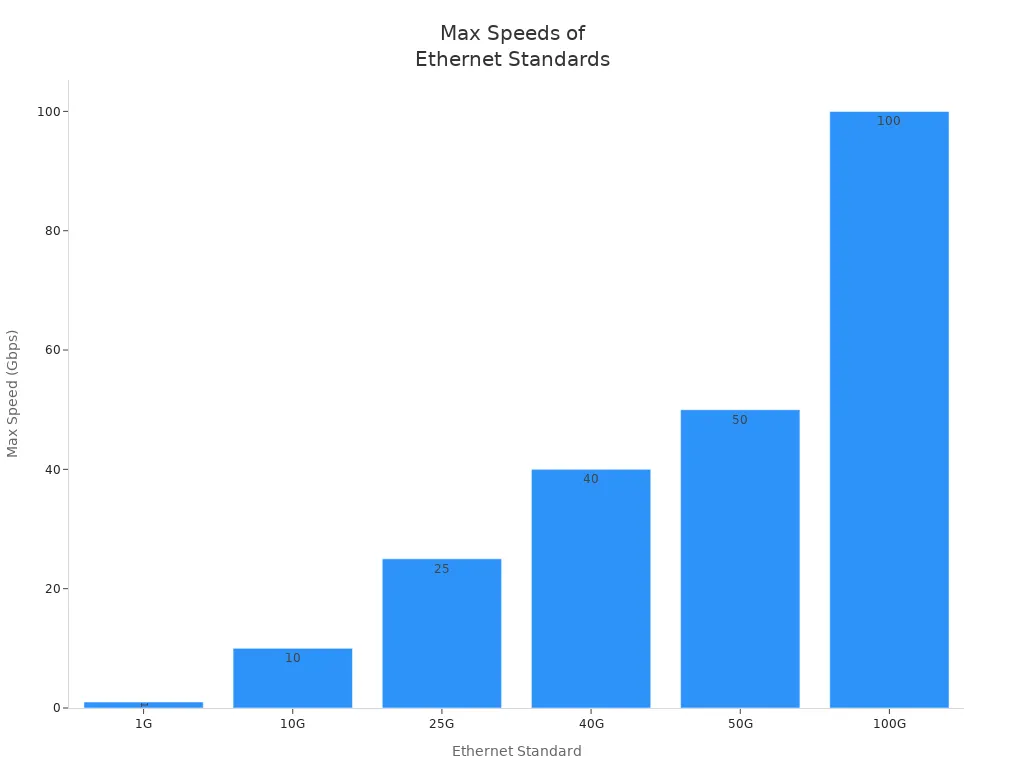
A good network interface can make your internet much faster and more reliable. If you use a network-capable device for online gaming or video streaming, you want low latency and high speed. Modern network interface cards support many Ethernet standards, which means you can choose the right speed for your needs.
| Ethernet Standard | Maximum Speed (Gbps) |
|---|---|
| 1G | 1 |
| 10G | 10 |
| 25G | 25 |
| 40G | 40 |
| 50G | 50 |
| 100G | 100 |
A high-quality network interface helps reduce lag and packet loss. You get smoother video calls, faster downloads, and better performance in busy networks. If you use wi-fi, a strong wireless adapter can help you avoid slowdowns from interference or distance. Many wi-fi standards, like 802.11ac and 802.11ax, offer fast wireless communication for your home or office.
🕹️ Tip: For the best online gaming or streaming experience, choose a network interface that supports high speeds and low latency.
Compatibility
You need to make sure your network interface works with your device and operating system. Not every NIC fits every computer or laptop. Some use PCI Express slots, while others connect through USB. If you use wi-fi, check that your wireless adapter supports the latest wi-fi standards.
- Check if the network interface matches your device’s form factor.
- Make sure the NIC supports your operating system and drivers.
- Look for compatibility with Ethernet or wi-fi standards, such as 802.11n, 802.11ac, or Gigabit Ethernet.
- Choose the right connection type for your needs, like Ethernet for wired or wi-fi for wireless.
A compatible network interface helps you avoid problems like slow speeds or dropped connections. You can use your device anywhere, whether you connect with cables or enjoy the freedom of wi-fi.
Security
A secure network interface protects your data from threats. You can use several features to keep your connection safe:
- Update your NIC drivers and firmware to block new security risks.
- Use MAC address filtering to allow only trusted devices on your network.
- Turn on 802.1X authentication for extra protection before devices join your network.
- Set up VLANs to keep different types of traffic separate.
- Disable any unused network interface ports.
- Keep your NIC physically safe from tampering.
- Watch your NIC’s activity for strange behavior.
If you use wi-fi, always use strong passwords and the latest encryption. This keeps your wireless communication private and secure.
🔒 Note: A secure network interface helps protect your personal information and keeps hackers out of your network.
A network interface controller acts as the bridge between your computer and the network, making sure data moves quickly and safely. When you understand how NICs work, you can solve network problems and improve your device’s performance.
You can check your NIC type by opening the Device Manager and looking under Network Adapters.
If you want faster speeds, review your current adapter’s features and consider upgrades like enabling offload features or adjusting buffer sizes. Knowing your NIC helps you stay connected and ready for any network challenge.
FAQ
What does a network interface controller do?
You use a network interface controller to connect your device to a network. It sends and receives data so you can browse the internet, play games, or share files with others.
How can you find out which NIC your computer uses?
You can open Device Manager on your computer. Look under "Network Adapters" to see the name and type of your network interface controller.
Can you upgrade your NIC for better speed?
Yes, you can upgrade your NIC. Choose a faster wired or wireless adapter to improve your internet speed and reduce lag.
💡 Tip: Upgrading your NIC can help you get smoother video calls and faster downloads.
What is the difference between wired and wireless NICs?
| Wired NIC | Wireless NIC |
|---|---|
| Uses cables | Uses Wi-Fi |
| More stable | More flexible |
| Faster speeds | Easier to move |
You pick wired NICs for speed and stability. You pick wireless NICs for convenience.
Do NICs help keep your data safe?
NICs use security features like MAC address filtering and encryption. You protect your data by updating drivers and using strong passwords.
🔒 Note: Secure your NIC to keep hackers out and your information private.