Choosing the Right Ethernet Cable Category
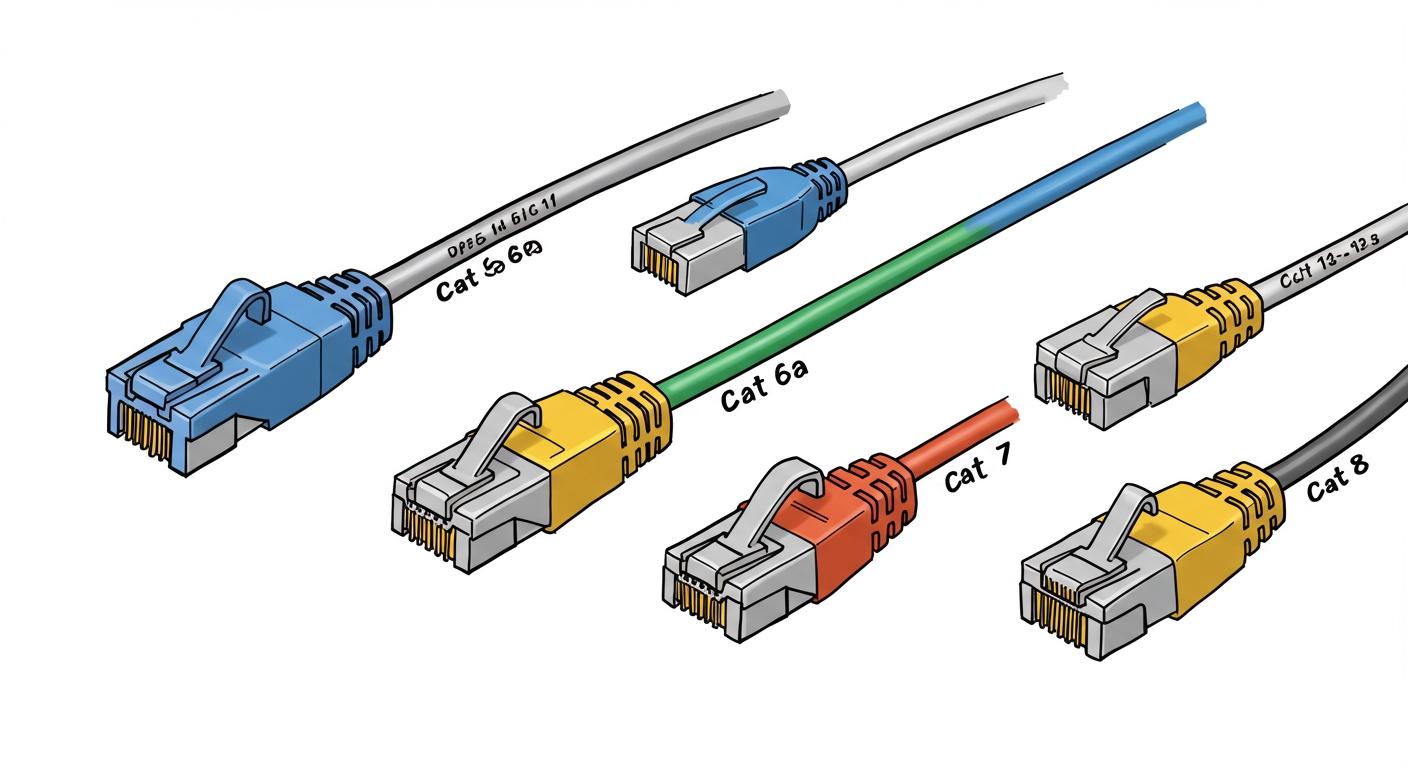
You need a new ethernet cable. For most homes with internet speeds up to 1 Gbps, a category 6 ethernet cable is your best all-around choice. This category offers a great balance of price and performance for your ethernet network.
If your budget is the top priority, a category 5e ethernet cable is a sufficient option, often costing 30% less than other ethernet cables. For future-proofing or speeds over 1 Gbps, you should choose a category 6a ethernet cable.
Understanding ethernet cable categories helps you pick the right category of ethernet cable. Different ethernet cables provide different speeds. This category choice ensures your ethernet connection is fast and stable. We have many ethernet cables for your ethernet setup.
Key Takeaways
- Cat6 Ethernet cables are best for most homes. They offer a good mix of price and speed for daily internet use.
- Choose Cat6a cables for new setups or faster internet. These cables support very fast speeds for future needs.
- Cat5e cables are a budget-friendly option. They work well for basic internet use if saving money is important.
- Cat7 and Cat8 cables are not for home use. They are for special, high-tech places like data centers.
- The right cable helps your internet work its best. It ensures you get the full speed you pay for.
Understanding Ethernet Cable Categories
When you look at different ethernet cables, you will see "CAT" followed by a number. "CAT" simply stands for category. A higher category number generally means the cable can handle faster speeds and more data. This is a key factor in understanding ethernet cable categories.
To choose the right cable, you need to understand two main performance metrics:
- Data Rate (Speed): This is how fast your data travels. We measure it in Gigabits per second (Gbps).
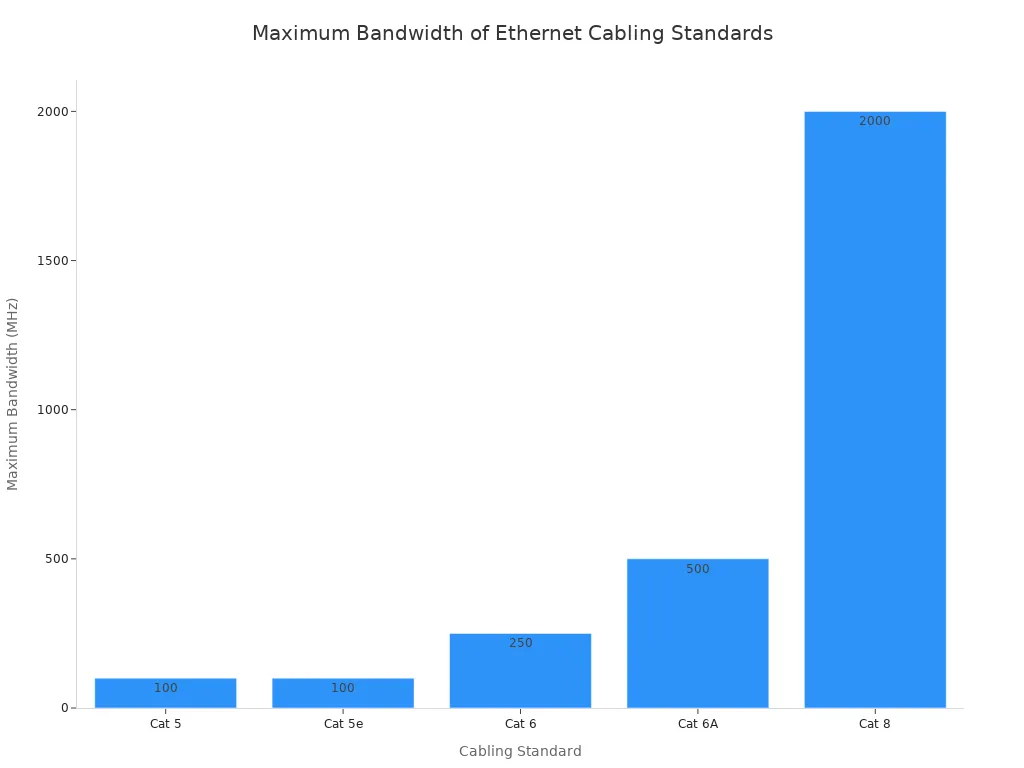
- Bandwidth (Capacity): This is how much data the cable can handle at one time. We measure it in Megahertz (MHz).
Think of bandwidth as the number of lanes on a highway. A highway with more lanes (higher MHz) can handle more cars (more data) at once, which helps you reach higher speeds (Gbps). While older ethernet cables had a simple relationship where 100 MHz allowed for 100 Mbps, modern ethernet cables use advanced encoding to send more data. This allows a category 6 cable, for example, to achieve much higher data rates over its specified bandwidth.
Let's explore the most common ethernet cable types.
Cat5e: The Budget Basic
The Category 5e (Cat5e) cable is an older but still capable option. It is the most affordable choice for basic networking.
- Speed: 1 Gbps
- Bandwidth: 100 MHz
- Best Use: Home internet plans under 1 Gbps, connecting devices like a router to a computer or a smart TV for streaming.
A Cat5e ethernet cable reliably delivers 1 Gbps speeds over distances up to 100 meters (328 feet). This performance is sufficient for many households. If your top priority is saving money and your data needs are simple, this category is a solid pick.
Cat6: The Modern Standard
The Category 6 (Cat6) cable is the current sweet spot for performance and price. It offers significant improvements over Cat5e, making it the standard for modern ethernet setups.
| Attribute | Cat5e | Cat6 |
|---|---|---|
| Twists per cm | 1.5-2 | 2 or more |
| Spline | No | Yes (usually) |
Cat6 ethernet cables have more tightly twisted wires inside. Many also include a plastic divider called a spline. These features physically separate the wire pairs, which reduces interference and allows for cleaner data transmission. This improved construction lets a category 6 cable support higher speeds. It can handle 1 Gbps over 100 meters and can even support 10 Gbps data speeds over shorter distances, typically up to 55 meters (180 feet). This makes it an excellent choice for gaming, 4K streaming, and a busy home network.
Cat6a: The Future-Proof Upgrade
Category 6a (Cat6a) is an augmented version of Cat6. You should choose this category if you want to prepare your network for future technology or if you have an internet plan faster than 1 Gbps.
- Speed: 10 Gbps
- Bandwidth: 500 MHz
- Best Use: New in-wall installations, multi-gig internet plans, and connecting high-demand devices like network-attached storage (NAS).
A Cat6a ethernet cable delivers a blazing-fast 10 Gbps data rate over the full 100-meter distance. It achieves this with a higher 500 MHz bandwidth and better construction. Cat6a ethernet cables are often thicker and may include shielding to protect against "Alien Crosstalk"—interference from other nearby cables. Because of this robust performance, standards bodies like the TIA recommend Cat6a for all new installations in commercial and healthcare buildings. It provides a long-term platform that can support future technology migrations, giving you more value from your ethernet network investment.
Cat7 & Cat8: Specialized and Data Center Use
You might see Category 7 (Cat7) and Category 8 (Cat8) ethernet cables for sale, but you should know they are not for typical home use. These ethernet cable categories are designed for very specific, high-performance environments.
Cat7 offers high bandwidth (600 MHz) but was never officially adopted by TIA standards for ethernet. It also requires a proprietary GG45 connector, which is not compatible with the standard RJ45 ports on your router and computer.
Cat8 is the official successor for high-speed copper data transmission. It is a powerhouse cable built for one primary location: the data center.
| Cable Type | Primary Applications |
|---|---|
| Cat7 | Not recommended due to non-standard connectors. |
| Cat8 | Data centers, server farms, professional networking with high-speed switch-to-server links. |
A Cat8 ethernet cable supports incredible speeds of 25 Gbps or even 40 Gbps with a massive 2000 MHz bandwidth. However, this power comes with a major limitation: its maximum length is only 30 meters (98 feet). For this reason, you will only find this category of ethernet cable connecting servers and switches inside a professional data center. For your home or office ethernet, Cat6 or Cat6a ethernet cables are the right choice.
Comparing Different Types of Ethernet Cables
Beyond the category, you will find other labels that describe how ethernet cables are built. Understanding these different types of ethernet cables helps you match the right cable to your environment and needs. The construction of an ethernet cable affects its performance and durability.
Shielded (STP) vs. Unshielded (UTP)
Most ethernet cables you see are Unshielded Twisted Pair (UTP). The twisted wires inside provide enough protection from interference for most home and office settings. They are flexible and affordable.
Shielded Twisted Pair (STP) ethernet cables have an extra layer of foil or braided shielding around the wires. This shield protects your data from significant electromagnetic interference (EMI).
You need shielded ethernet cables in environments with heavy electrical noise. Think of locations like:
- Factories or industrial settings
- Hospitals near medical equipment
- Areas close to large HVAC systems or power lines
For the shield to work, you must connect it to a proper ground. If you do not ground the ethernet cable, the shield becomes ineffective. This means you waste money on a feature that is not protecting your data.
Solid vs. Stranded Conductors
Ethernet cables use either solid or stranded copper conductors inside. Your choice depends on how you plan to use the ethernet cable.
- Solid Conductor Cables: These use a single, solid wire for each conductor. They have less signal loss, making them perfect for long, permanent runs inside walls. You should use solid ethernet cables for connecting wall jacks to a central patch panel. They carry data reliably over distance.
- Stranded Conductor Cables: These use a bundle of tiny, thin wires for each conductor. This construction makes the ethernet cable very flexible. You should use stranded ethernet cables for patch cords—the shorter cables that connect your computer to the wall or your router to your gaming console. Their flexibility is ideal for areas where the cable might be moved often.
Cable Length and Performance
Every category of ethernet cable has a maximum length limit. For most ethernet connections, this limit is 100 meters (328 feet).
Signal strength naturally weakens over distance. This is called attenuation. If your ethernet cable is too long, you can experience:
- Slower data speeds
- Lost data packets
- An unreliable connection
While a Cat6 cable can support 1 Gbps data speeds up to 100 meters, its 10 Gbps capability is limited to shorter distances, typically around 55 meters. For the best performance, always use the appropriate category and length for your ethernet setup to ensure fast and stable data transmission.
Best Cable for Your Use Case
Now you know the technical details. Let's match the right ethernet cable category to your specific needs. Making the right choice when buying ethernet cable ensures you get the performance you pay for.
For Home Networking and Streaming
For a typical home, your main goal is a smooth experience for streaming, browsing, and connecting smart devices. A Cat6 ethernet cable is perfect for this. It easily handles the data demands of a modern household.
Streaming services have specific data requirements. A single 4K stream needs about 25 Mbps.
| Video Resolution | Recommended Bandwidth |
|---|---|
| 4K | 25 Mbps (minimum) |
| 8K | 50 Mbps (minimum) |
A Cat6 cable supports speeds up to 1 Gbps. This is more than enough bandwidth to run multiple 4K streams at once without buffering. This category provides a fast and reliable ethernet connection for all your data needs.
For Gaming and High-Performance Needs 🎮
Gamers need a stable connection to reduce lag. While your cable category does not directly lower your ping, it does prevent other issues that cause lag. A better ethernet cable ensures stable data transmission.
Online games use little bandwidth, but they are very sensitive to lost data packets. A Cat6 or Cat6a cable is better at handling interference and provides more stable bandwidth than Cat5e. This stability prevents packet loss, giving you a smoother gaming experience. For competitive gaming, the reduced crosstalk in Cat6a ethernet cables ensures the most stable data connection.
For Office and New Installations
When you are wiring an office or a new home, you should plan for the future. In this case, Cat6a is the best category. Your decision when buying ethernet cable for an installation is a long-term investment.
Cat6a ethernet cables offer two major advantages:
- 10 Gbps Speed: This category supports a full 10 Gbps data rate over 100 meters. This prepares your ethernet network for future multi-gig internet plans and high-speed devices.
- Power over Ethernet (PoE): Cat6a ethernet cables can power devices like security cameras and VoIP phones. This feature simplifies your ethernet setup by sending power and data through a single cable.
Choosing from all the ethernet cable categories comes down to your specific needs. For most users, a category 6 ethernet cable is the ideal choice. This category offers a great balance of price and performance for your ethernet network, handling your daily data reliably. These ethernet cables ensure your data moves fast.
Your final decision balances your current needs with future plans. Choose a category 6a ethernet cable if you are installing new ethernet cables in walls or have a multi-gig internet plan. This category ensures your ethernet can handle future data demands. Only consider a category 5e ethernet cable if your budget is the top priority and your data needs are minimal. These ethernet cables are for basic ethernet data.
FAQ
Can I use a Cat7 or Cat8 cable for my home?
You should avoid Cat7 and Cat8 cables for home use. These categories are designed for data centers and have special requirements.
Cat8 cables, for example, have a very short maximum length of 30 meters. A Cat6 or Cat6a cable provides the best performance for your home network.
Will a better Ethernet cable increase my internet speed?
A new cable cannot make your internet plan faster. However, an old or low-quality cable can slow you down. A good cable helps you get the full speed you pay for.
- Your internet plan sets your maximum speed.
- Your cable ensures you can reach that speed.
Are all Ethernet cable connectors the same?
Most modern Ethernet cables use the same RJ45 connector. This is the standard plug that fits into your computer, router, and other devices. You will find this connector on Cat5e, Cat6, and Cat6a cables, making them interchangeable.
Does the color of an Ethernet cable matter? 🎨
The color of an Ethernet cable does not affect its performance. Cable color is only for organization. You can use different colors to easily identify which cable connects to which device, such as using blue for computers and yellow for printers.